Brad L's 1995 Cadillac Sedan Deville

Items installed:
- Pioneer DEH-P6900UB
Installation Description
At first I was all over the internet looking for a mounting kit for this car and could not find one that seemed like it would work, so I fabricated one of my own. I used a kit for a 1995 Cadillac Seville and made two aluminum extensions so I could screw the mounting kit to the dash. It took a bit to get lined up, but once it was it looked like it belonged. Then I ran the 14 wires and antenna wires to the truck and hooked them up to where the original brain of the radio was. The stock speakers were great for being 13 years old, because the engineers at GM put an amp in there from the factory so I had my 22 RMS amps going to the amp, and getting amplified then to the speakers. Turned out great.
Q&A Section
Why did you decide to upgrade your A/V system?
Stock CD player broke.
What's the first thing you show people about your installation?
My custom mounting bracket and how loud it gets on the factory speakers and amp.
Why did you choose these products?
The USB function and the reliability of Pioneer.
What was the most difficult part of the installation?
Soldering and fabricating, then running my custom wiring harness to the trunk.
What plans, if any, do you have for future upgrades?
No future upgrades, my sister bought the car.
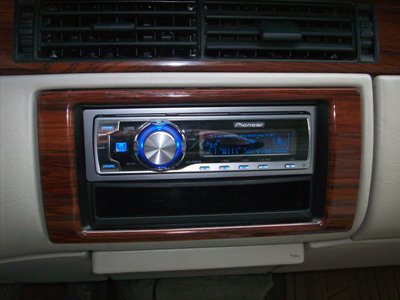 This is a straight on veiw of the radio, it looks like it belongs there.
|
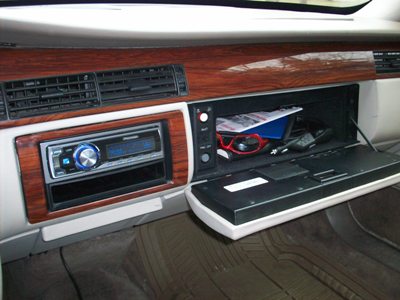 I ran the USB cable into the glove box and kept my iPod locked in there.
|
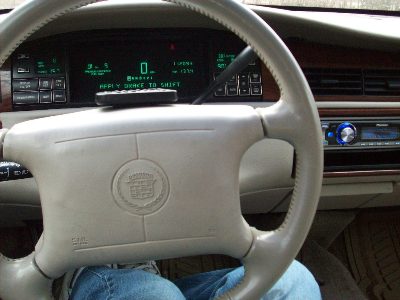 View from the driver. I velcroed the remote to the steering wheel for added control and it worked great. View from the driver. I velcroed the remote to the steering wheel for added control and it worked great.
|



Terrence Mayes from Atlanta
Posted on 3/15/2019
Hey man I got a 1996 deville trying to put a radio in . I bought a harness but my car harness dont have power and memory wire
Alexander H. from Crutchfield
on 3/20/2019