Mobile video installation guide


This installation guide offers examples of mobile video system types and suggested layouts. The installation of your system will depend upon the make and body style of your vehicle as well as the equipment purchased.
You can also download a PDF of the Mobile Video Installation Guide. Note: To view this file, you will need the Adobe Acrobat PDF reader (free download).
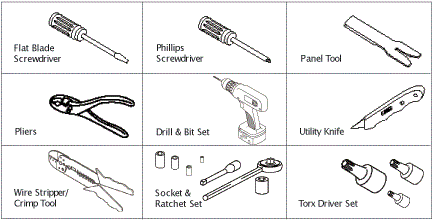
Tools needed (depending upon the vehicle)
Replacement Headrest Monitors
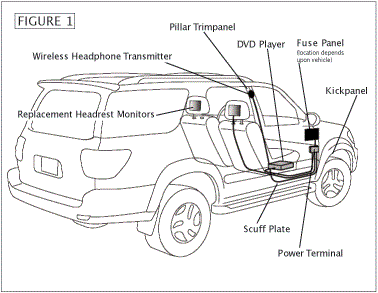
The components of this type of mobile video system include a DVD player, one or two replacement headrest video monitors, and a sound component (usually wireless headphones).
System Layout
A system using replacement headrest monitors is shown with suggested locations for components and wire routing (Figure 1). Examine your vehicle to determine the best mounting locations.
Mounting Components
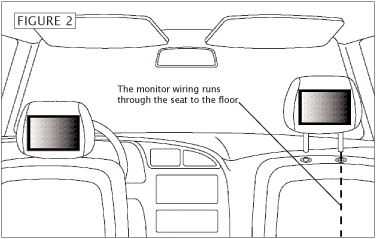
Replacement headrest monitors fit into the same slots in top of the seat that hold the factory headrests. The wiring is fed through the seat to the the floor (Figure 2), and then routed to the power terminal block (as shown in Figure 1). Depending upon the vehicle, the DVD might be mounted under the seat, under the dash, or in the console area. Many headrest monitors include a built-in DVD player, simplifying the installation process. Use the instructions and hardware supplied with each component to secure it in the desired location.
 |
Wire Routing
All system wiring should be concealed for safety and to give your installation a nice finished look. Wires should be secured so that they do not interfere with safe vehicle operation. Depending upon the vehicle, the wiring for your system may need to be run under the dash, door scuff plate, pillar trimpanel, kickpanel, or headliner. See below for details showing how these trimpanels are typically removed. It will be necessary to run a power wire to the main fuse panel of the vehicle (see bottom of the article).
Wiring Connections
See a full layout of components at the end of the article.
Headrest-mounted Monitors
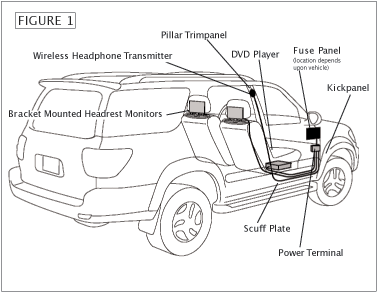 |
The components of this type of mobile video system include a DVD player, one or two headrest-mounted video monitors, and a sound component (usually wireless headphones).
System Layout
A system using bracket-mounted headrest monitors is shown with suggested locations for components and wire routing (Figure 1). Examine your vehicle to determine the best mounting locations.
 |
Mounting Components
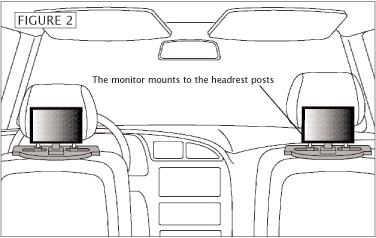
Bracket-mounted headrest monitors secure to most removable two-post factory headrests. You simply remove the headrest, slide the monitor mounting bracket over the posts, and reinstall the headrest (Figure 2). Depending upon the vehicle, the DVD might be mounted under the seat, under the dash or in the console area. Use the instructions and hardware supplied with each component to secure it in the desired location.
Wire Routing
All system wiring should be concealed for safety and to give your installation a nice finished look. Wires should be secured so that they do not interfere with safe vehicle operation. Depending upon the vehicle, the wiring for your system may need to be run under the dash, door scuff plate, pillar trimpanel, kickpanel, or headliner. See below for details showing how these trimpanels are typically removed. It will be necessary to run a power wire to the main fuse panel of the vehicle.
Wiring Connections
See a full layout of components at the end of the article.
Overhead Monitors
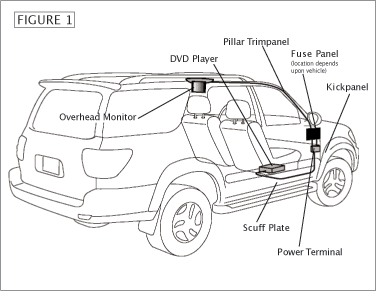 |
The components of this type of mobile video system include a DVD player, an overhead video monitor, and a sound component (usually wireless headphones).
System Layout
A system using an overhead monitor is shown with suggested locations for components and wire routing (Figure 1). Examine your vehicle to determine the best mounting locations.
Mounting Components
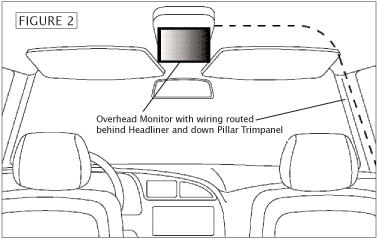
The overhead monitor secures to the center ceiling. Be sure it is located for easy viewing by rear passengers (Figure 2). Many overhead systems feature a built-in dome light in case you have to remove yours for the installation. Use the instructions and hardware supplied with each component to secure it in the desired location. Please note: Overhead monitor installation is a complex and lengthy process — it is recommended for experienced installers only.
 |
Wire Routing
All system wiring should be concealed for safety and to give your installation a nice finished look. Wires should be secured so that they do not interfere with safe vehicle operation. Depending upon the vehicle, the wiring for your system may need to be run under the dash, door scuff plate, pillar trimpanel, kickpanel, or headliner. See below for details showing how these trimpanels are typically removed. It will be necessary to run a power wire to the main fuse panel of the vehicle.
Wiring Connections
See a full layout of components at the end of the article.
Monitor & Built-in DVD Player
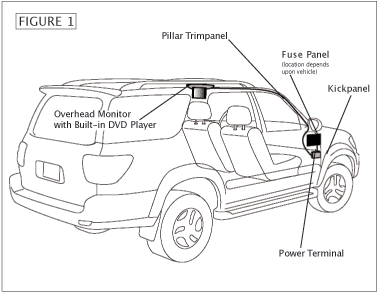 |
The components of this type of mobile video system include an overhead video monitor with a built-in DVD player, and a sound component (usually wireless headphones).
System Layout
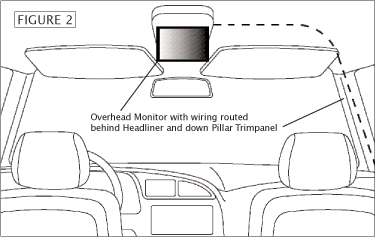
A system using an overhead monitor with built-in DVD player is shown with suggested locations for components and wire routing (Figure 1). Examine your vehicle to determine the best mounting locations.
Mounting Components
The overhead monitor secures to the center ceiling. Be sure it is located for easy viewing by rear passengers (Figure 2). Many overhead systems feature a built-in dome light in case you have to remove yours for the installation. Use the instructions and hardware supplied with each component to secure it in the desired location. Please note: Overhead monitor installation is a complex and lengthy process — it is recommended for experienced installers only.
 |
Wire Routing
All system wiring should be concealed for safety and to give your installation a nice finished look. Wires should be secured so that they do not interfere with safe vehicle operation. Depending upon the vehicle, the wiring for your system may need to be run under the dash, door scuff plate, pillar trimpanel, kickpanel, or headliner. See below for details showing how these trimpanels are typically removed. It will be necessary to run a power wire to the main fuse panel of the vehicle.
Wiring Connections
See a full layout of components at the end of the article.
Wire Routing and Trimpanel Removal
Wire RoutingThe routing and concealment of your wiring depends upon your vehicle and where the components of your system are placed. The instructions below address, in general, what panels may need to be removed and how they typically come off. Often, panels can be pried up at edges. Screws and retaining clips might also be present that will require removal (Figure 1). To prevent damage, always use care when removing panels. | 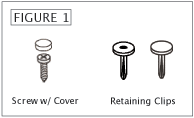 |
Door Scuff Plate removalThe plates are usually removed by prying up the edges to release clips. Some vehicles will have screws present which will need to be removed (Figure 2). | 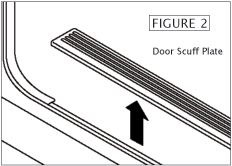 |
Seat Belt removalA seat belt may be located on the panel that needs to be removed. Most seat belt anchor covers pry off. The seat belt anchor is secured with a large nut or bolt (Figure 3). | 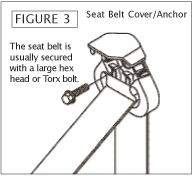 |
Pillar Trimpanel removalRemove seat belt if present. Remove screw covers, screws and plastic retaining clips, if present. Pry up edges of panel to remove (Figures 4 & 5). | 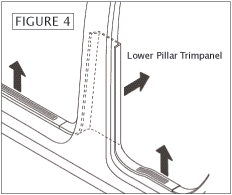 | 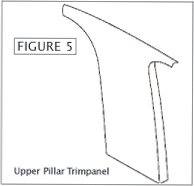 |
Kickpanel removalLook for screws and pry-out retaining clips to remove. Pry out edges of panel to release and remove (Figure 6). | 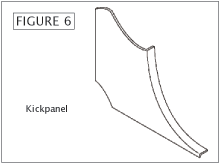 |
Routing wire behind dash
Route wire behind dash and secure with plastic wire ties. Be sure that wire does not interfere with any moving parts to ensure safe operation of vehicle.
Routing wire for components and power connections
Determine desired locations for each component. Use the most direct route for wires. Remove panels necessary to route and conceal wires. Test system before reinstalling panels.
Wiring Connections
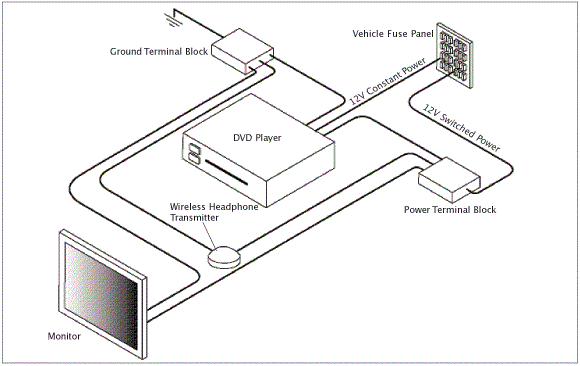
This illustration is a generic example of the layout of the components in a typical video system. Use our tips above for running the wires through your vehicle, and follow the instructions in this guide in conjunction with those supplied with your components for making the connections.





Alexander Hrabe from Crutchfield
Posted on 11/4/2016
Brent, we don't have the diagram you're looking for. This will be a big DIY project, and you may want to consider purchasing Crutchfield Tech Support - 90 days-worth for only $30. Check out our tech support page for details. Or try a local installer.
Brent from Washington Township
Posted on 11/2/2016
Do you have any wiring diagrams with regards to 4 headrest monitors? I have inherited a 2005 Suburban with 4 headrest monitors, but they have also installed 2 separate DVD receivers in the back. I was looking to wire all four to an indash receiver and have control over all 4 monitors from the front seat. Thanks.
Alexander Hrabe from Crutchfield
Posted on 5/11/2015
Paul, Installing backseat video can be a time-consuming process because it entails wiring both headrest units for power and sound (depending on your preferences). However, the Rosen AV7700 Headrest Piggyback System may be something to consider. It includes two units and you wouldn't have to alter your headrests. Feel free to give us a call if you have any questions about other backseat video options. And don't forget, if you purchase from us, you'll receive lifetime Tech Support should you need help with your installation.
Paul from Preston
Posted on 5/10/2015
I am desperately trying to find an idiots guide to installing twin headrest DVD players in my 2006 Chrysler 300C. I have been given some ridiculous quotes so far so I am going to try and do it myself but I don't know what to do, or how or where to wire them up to. Can you email me an idiots guide or give me some help please. Thanks. Paul