How to connect your home theater subwoofer
Plus tips on placement and fine-tuning

In a nutshell: To get the biggest bang from your new home subwoofer, you need to do three things.
- Properly connect it to your home theater receiver
- Place it in just the right spot
- Tweak it — calibrate your system and adjust the sub's settings
Read on to learn everything you need to know.
T
ight, well-defined and, yes, DEEP bass is a key component of any home theater. A powered subwoofer is a must for bringing those explosions, crashes, and other big-time action to life. Here's how to hook it up and dial it in.
1. How to connect your subwoofer to your receiver
All powered subwoofers require two connections: power and signal.
For power, you just need a nearby outlet. We highly recommend plugging your sub into a power protection device to guard against surges.
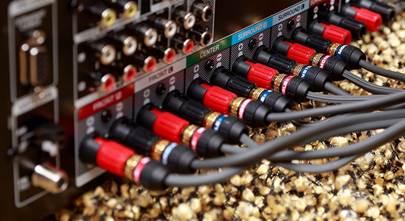
For the signal, use a subwoofer cable to connect your receiver’s subwoofer output to the LFE (low frequency effect) input on the sub.

Many stereo receivers and amps also have subwoofer outputs for these connections. Don't have an LFE option? See our bonus tip below.
2. How to choose the right place for your sub
Typically you should try and put the subwoofer near your front speakers. But let’s be honest: most people put their subwoofer wherever they have room. And that’s not necessarily a bad idea.
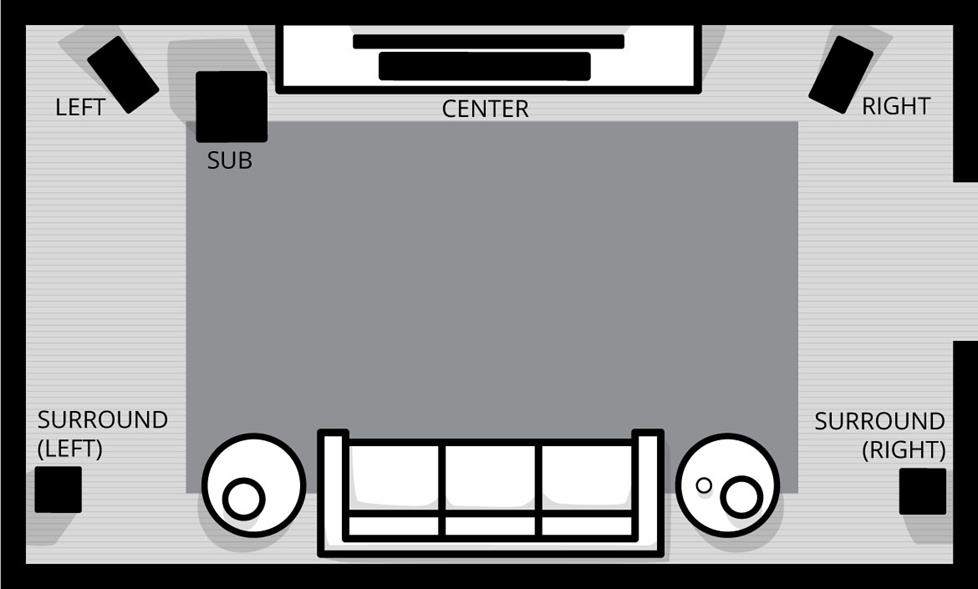
The low-frequency waves we hear as “bass” are less directional than higher frequencies generated by full-range speakers. That means that even if the subwoofer isn’t close to your TV, your ears will have trouble telling the difference.
Some manufacturers recommend placing your sub in a corner. The walls can help bounce more waves back toward the seating areas. If you’re after very full, exciting bass response, this is a good option.
If you have a few placement options and a long enough subwoofer cable, you may want to experiment with different placement options. Fire up some music with some good bass. Then sit in your primary seat and listen. Does the bass sound weak? Or maybe too boomy?
Now move to a couple of different spots and listen. You’ll probably notice that the bass can sound very different as you change locations.
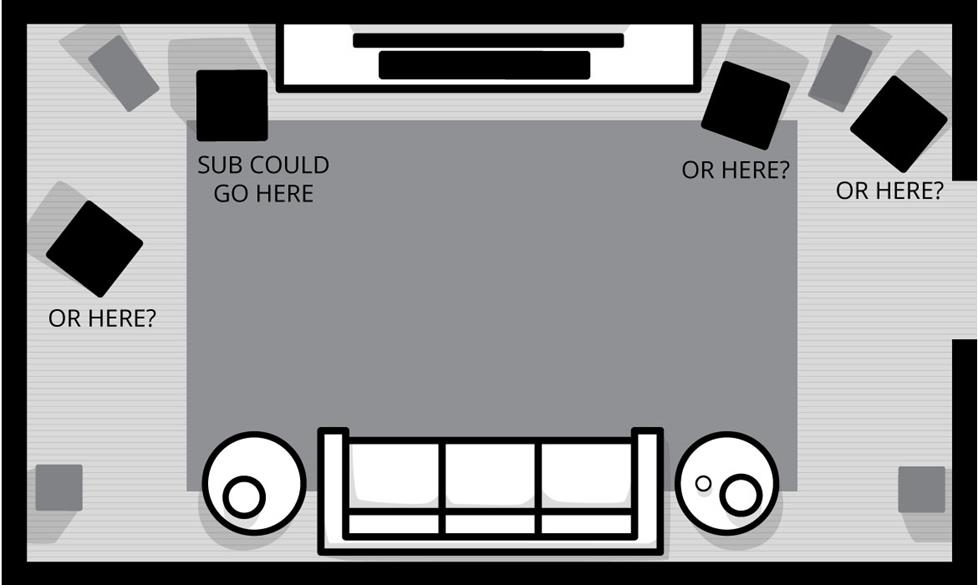
If you used auto-calibration to set up your home theater system, remember to rerun it every time you move your sub.
To tailor the bass to your “sweet spot” use the popular method known as “crawling.” Start with the subwoofer at or near your primary listening position. Then stand in different spots the sub could go and listen to your chosen sample music. When you find a spot where the bass sounds just right, that’s where you should put your sub.
Not enough bass? Try two subs
If you have a very large room that’s bass-challenged, we recommend adding a second subwoofer. It’s the best option for evenly distributing bass response in a large space. Most newer receivers offer a second subwoofer output for connection. Or you can simply use a Y-adapter.
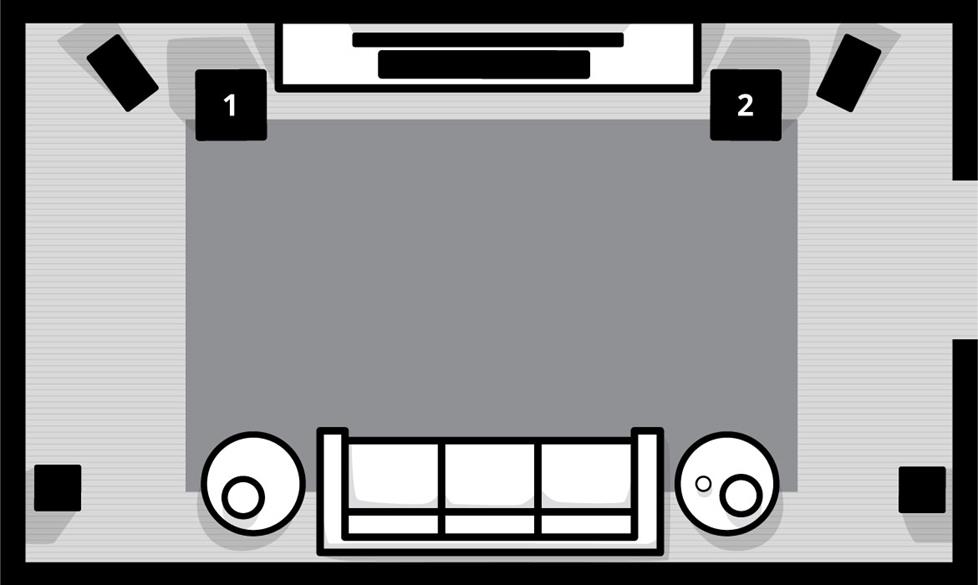
For some suggestions and diagrams of speaker setups for different floor plans, check out our article on home theater speaker placement.
3. Tweak it
Most receivers include a calibration microphone to optimize the performance of your speakers. Usually, these room correction systems do a very good job of adapting the sound to your surroundings. Check out our Home theater receiver setup guide for more info and to watch a video about auto calibration.
But what if your receiver doesn’t have auto calibration? Or you’ve tried it and still aren't completely satisfied? You can make some manual adjustments.
Setting speaker size — Go into your receiver’s settings menu and find the speaker setup. There will be a size setting for your front left and right speakers. This actually has less to do with the physical size of your speaker. It's more about bass management.
Try setting the speakers to “small,” even if you’re using floor-standing speakers. The “small” setting will send more of the low frequencies to the subwoofer.
Crossover — Setting the speaker size automatically sets a crossover point. But you can fine-tune it manually. For bookshelf speakers, you’ll want a crossover frequency around 120 Hz. For large tower speakers, try 60 Hz.
Phase switch — If your sub still feels a little off, your subwoofer may be out of phase with your speakers. Most subs have a two-position phase switch on the back. Toggle it to the other setting and see if you get better bass.
Level control — Most subs have independent volume controls. It’s an easy way to get a little more oomph or dial back a particularly loud soundtrack. You may need to make adjustments from movie to movie.
Put your sub on a platform — If your floor, walls, and ceiling vibrate to the beat of your sub, you get unwanted resonances that color the sound of your bass. To stop the vibrations, place your sub on a sound-absorbing platform.
Bonus tip
What if my receiver doesn’t have a sub output or my sub has no LFE input?
Depending on your available connections, you may be able connect your sub using one of the following two options:
To use stereo preamp-level connections, you may have to switch your sub out of LFE mode.
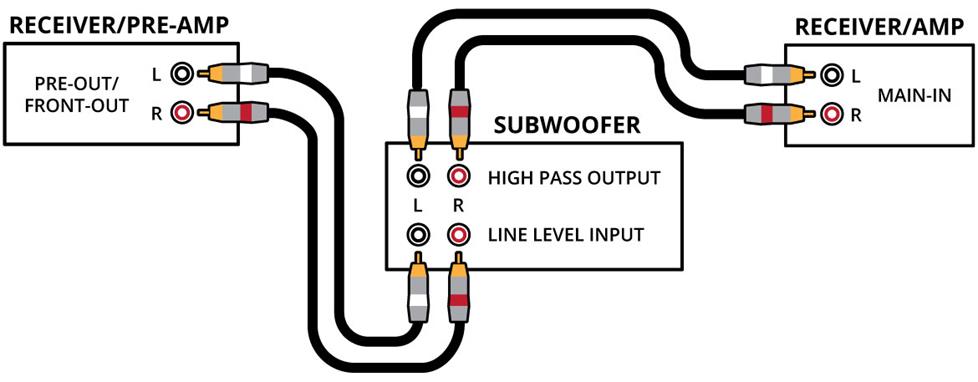
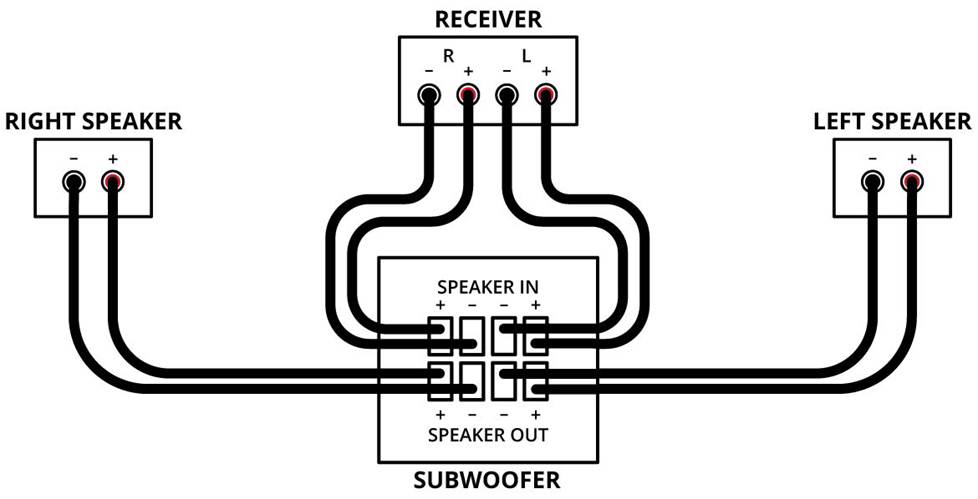
With some subs, you can connect your receiver's front speaker outputs to the sub's speaker-level inputs, and then connect your front speakers to the sub's speaker outputs.
Our tech support team is here to help
If you purchase your home theater gear from Crutchfield, our Virginia-based Tech Support team can help you with setup, connections, and fine-tuning. Give them a call at the phone number found on your invoice and shipping confirmation email.
Need help choosing a powered subwoofer?
Need help choosing a sub? Check out our Subwoofers buying guide. Or contact us today.



Neydson from salvador ba brazil
Posted on 10/5/2023
Materia muito bem explicada, a equipe está de parabens.
Steve Kloscak from Goodyear
Posted on 11/2/2021
Regarding: Setting speaker size. Speakers enclosures have built in crossovers, from the manufacturer. No need to block low frequencies from the AVR to the speaker. Set them to large because the internal crossovers with work correctly. Then use LFE + Main for the subwoofer setting. My system sounds way better with this setup. I have a Denon AVR
Stephen Hoffman from Aberdeen,MD
Posted on 10/13/2021
How do I find a professional installer in my area?
Eric Angevine from Crutchfield
on 10/14/2021
Hamilton Gray from Srilanka.. Negombo
Posted on 9/30/2021
Thank you very much for guiding us how to get the maximum out of a Subwoofer.. Great information..
Matthew from Portland, OR
Posted on 9/14/2021
My receiver doesn't have a sub out. If I run speaker wire to the sub input and then out to the mains, do I have to run both L and R speakers through the sub to keep them sonically balanced or can I have one main wired directly from the receiver to reduce the wire sprawl?
Eric Angevine from Crutchfield
on 9/15/2021
Victor from Hamden
Posted on 2/28/2021
Hi, do I need a rca y splitter for my psw10 ( because it has a r and l rca plugs)or can i just use a single rca ,using one side on the sub,connected to my sony 590 reciever? Some people have said that using both rca plugs on the sub makes it louder . Thanks.
Eric Angevine from Crutchfield
on 3/1/2021
Kyle Kondert from Sioux Falls, SD
Posted on 2/27/2021
Hi. I have a couple questions for you... I have a Denon X2300W Receiver. (I need to upgrade) and a Helfire XTEQ12 Powered sub. I bought a Mediabridge 8 foot Y cable. Would I be able to use that cable to connect them? Its a nice cable, hate to find out that I couldn't use it. My other question is, I have Definitive Technology Mythos STS towers and the amp on one of them doesn't work anymore so there isn't anything to drive that woofer. Can I use my sub out to connect to it to drive the woofer? The Mytho does have an LFE in. Sorry, I have one more question. I have Def Tech SR9080'S and SR9040'S surrounds. Which ones should I use for my sides and which for my rears? So I guess have 3 questions for you to HOPEFULLY answer for me. I wish that I was able to find a replacement amp for my mytho STS. I hear they kinda had programs with them I guess. I have the Def Tech CS9080 Center channel also. I had the system for almost 5 yrs now. I actually had the SR90840's for just about a yr. I got both for the price of one. They were used but in pristine shape. I had to jump on that opportunity. My weakest link is the Denon, can't afford to upgrade quite yet. Lol. Well I guess the Mytho tower is one too but only for now. I really like the Mytho's so I have to find a way to replace the amp on that...Anyway, any answers that you can give me and/or that you can find out, I would REALLY REALLY appreciate it. Thank you so much in advance.
Eric Angevine from Crutchfield
on 3/1/2021
Louis Messere from Youngstown
Posted on 2/25/2021
How do I connect a powered sub with an lfe connection to a new receiver that has rca connections? I'm upgrading receivers and would like to keep my life powered sub, but the receivers all have rca jacks.
Eric Angevine from Crutchfield
on 2/26/2021
Christopher from Windsor
Posted on 2/1/2021
Hi - I bought a Cambridge CXA81 integrated amplifier and Focal Chora 826 floorstanders. I prefer a sub to round out the lower frequencies and provide some 'kick' but cannot for the life of me figure out the best way to connect the CXA81 to the SVS SB-2000 subwoofer I bought. I tried the Subwoofer output on the CXA81 - it's "OK" but not as good as I was expecting...I've read online that the Subwoofer output on the CXA81 is WAY too high to really matter much...Is another option to use the Pre-Out to connect to the Subwoofer and then back into the CXA81? But then I don't know how I would switch inputs on the CXA81. Any advice on how to set this up would be appreciated. Thank you!
Eric Angevine from Crutchfield
on 2/2/2021
Rick Munn from Charlottetown
Posted on 1/1/2021
Hi, Greatly appreciate all of Crutchfield's tips and self-help articles, they're fantastic! Kind Regards, Rick