Car audio noise suppression guide
Diagnosing and treating noise problems in your car audio system

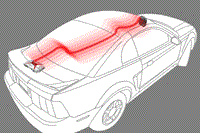
This guide will help you diagnose and treat problems with extraneous noise in your car audio system.
Dealing with static, whining, and buzzing
You've installed a new receiver or amplifier in your car, and now you have a noise problem. Noise in your audio system commonly comes in these three forms:
- Radio static
- Amplifier whine
- Buzzing speakers
What can you do? The trick is to determine what the source of the noise is. Noise can be introduced into your system from a number of sources. This is especially true if you have an amplifier. The type of noise you're hearing can help determine the cause.
Read over this article for some hints and explanations of what can cause noise in your system. Use it as a checklist, eliminating possibilities until you find the culprit. You can also use this DIagnostic Flowchart as a guide to walk you through the troubleshooting process.
And don’t forget – if you purchased your gear from Crutchfield, don't hesitate to call on our tech support team (have your Crutchfield invoice handy).
Noise and your new receiver
If you’ve just installed a new receiver, here are two quick and easy starting points:
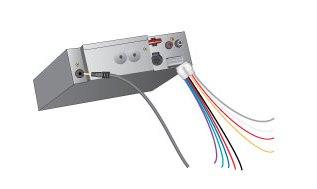
Noise in your receiver is often due to a poor ground wire connection or a poorly grounded antenna.
Is your receiver securely grounded?
Improper ground is one of the biggest causes for introducing noise into your audio system. Is the ground wire located near a noise source (like a heater, air conditioner, or computer)? Is the ground wire actually connected to the vehicle's ground? Since the antenna lead can act as a ground (thereby enabling a new receiver to operate without its ground wire properly connected), the antenna lead is frequently the source of noise problems.
Radio static can be caused by antenna noise
Check to see if you're getting noise on all sources — CD, auxiliary/USB, AM, and FM.
If the noise is present only on the radio, then it's most likely coming through your antenna lead.
Unplug the antenna. If the noise goes away, try an antenna noise suppressor (like American International's AS100). This filter plugs in-line between your receiver and your antenna, breaking the ground path between them, thus preventing noise from entering your system.
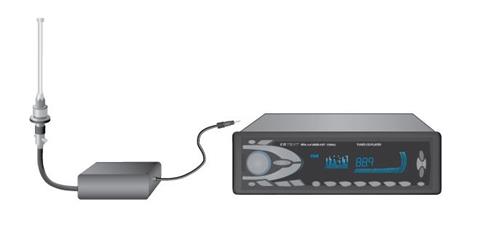
An antenna filter, installed between the vehicle's antenna and the receiver, can minimize noise entering your system from a poorly grounded antenna.
Radiated noise
If the noise isn’t coming in through the antenna, try pulling the receiver from the dash while a CD is playing. If the noise goes away, it's being radiated into your system due to the receiver's proximity to a noise producer (like a heater motor or car computer). This is often referred to as “sideway noise.”
If the noise-causing accessory has a motor, a source noise filter can be installed on the accessory's power lead to minimize radiated noise. If the car computer (or other motor-less accessory) is causing the problem, move your receiver's wiring away from that accessory to minimize the radiated noise.
Try using magnetic shielding foil (also called Mu-metal) to shield the back of the receiver or wrap the wire or component that's radiating the noise into your system.
Engine noise and alternator whine
Noise introduced through the power and ground wires connected to your receiver is called engine noise or alternator whine. If engine noise is your culprit, you may hear a whining or clicking sound. Its pitch will usually vary with engine speed.
If this is the case, you can install an alternator noise filter on the power line between the battery and the alternator to minimize the problem. You can also install a noise filter on the receiver's power lead to cut down on signal pollution (American International's S15A (15-amp, 250-watt) or S25A (25-amp, 350-watt) filters, for example). Most often, however, alternator noise comes from a loose or intermittent ground connection. See the section below about noise in the electrical system.
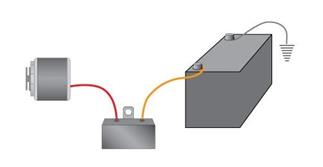
An alternator noise suppressor connects inline between the alternator and battery, and can reduce high-pitched whining noise that modulates according to engine RPMs.
Noise and your new amplifier
An amplifier can introduce noise into your system through a bad ground or through a poor mounting. Rubber grommets or feet can help isolate the amplifier from the chassis of the vehicle, a potential source of noise. If all else fails, install a noise suppressor. The tricky part is figuring out which step or steps to take. Please read the rest of this section and try some of the simple tests.
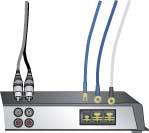
Where is the amp mounted?
Is it near something that could be radiating noise, like a rear-mounted tuner or computer? If so, unbolt it and move it away to see if the noise stops. Remove your patch cables. If you still hear noise, check to see if your amp is isolated from the vehicle's chassis. Any contact between your amp's metal casing and your vehicle's body could cause noise problems.
Check your ground wire
Is it securely attached to the vehicle's chassis with a good contact to clean metal? Your ground wire should ideally be 18" long at most — a longer ground wire can cause noise problems. Improper grounding causes most system noise problems.
Check your gain structure
If you have an external amplifier in your system, the first thing to do is to quiet any system noise, which sounds like a constant, low hiss. First, check for system noise with the engine off. Insert a CD and put your CD player on pause. Listen to the system with the volume way down, then way up. Put on music. If you hear hiss or static in either instance, reduce the gain on your amplifier.
Pass more signal from the receiver to the amp by leaving the receiver's volume higher before you set the amp's gain. Experiment until you eliminate the hiss or reduce it as much as possible. A tiny bit of hiss is okay — you won't hear it while driving.
Noise in the patch cables
Noise can be picked up by the RCA patch cables connecting your components. To test this, detach the cables from your amp. Insert one side (left or right) of a spare patch cable into the amp's left and right input jacks (see illustration below). Turn on your system and engine.
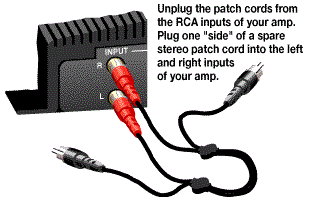
If the noise is gone, reconnect the cables to the amp, and disconnect them from your receiver. If you hear the noise, your patch cables are definitely picking it up. Try re-routing them. Separate them from your power cable by at least 18 inches. You could try a better brand of patch cables. The inexpensive RCA cables many people use to connect their components don't have the insulation or conductivity necessary to deflect noise in a metallic, highly conductive automobile.
How much noise your cable receives depends largely on the size of its “loop area” — the larger the loop area, the more vulnerable your cable is to induced interference. A cable's loop area is equal to the distance between its center conductor and outer shield times the length of one complete twist in a twisted pair configuration, or the entire length of the cable in a coaxial type. Consider trading your old cable for one with a twisted pair design. You'll get a smaller loop area and less noise.
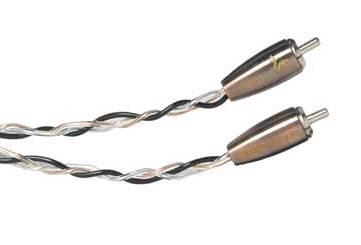
Patch cables with a "twisted pair" design help reject noise
As a last resort, a ground loop isolator (like PAC's SNI-1) can be installed between the receiver's preamp outputs and your amp to minimize this problem.
Noise and whine picked up by the power or ground cables
We discussed ground cables above, because that’s the cause of noise more often than not. If the noise wasn’t due to a poor ground or through the stereo’s antenna cable, it may be coming in through the amplifier's main power cable. Noise can be created by cable of insufficient gauge, so you might try thicker cable.
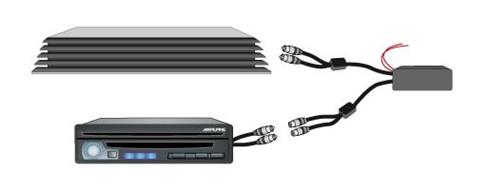
If you cannot find the faulty ground in your multi-amp system, a ground loop isolator can help minimize the problem.
Multiple amplifiers can also create ground loop problems, which can usually be solved by grounding each amplifier with its own separate wire. If you are unable to locate the cause, a ground loop isolator (like PAC's SNI-1) can be installed between the receiver's preamp outputs and the amplifiers to minimize this problem.
Noise in speaker wiring
Noise can also come in through the speaker wires. To test them, turn the system off and disconnect the speaker wires from the amps. Now start the car. If the noise is still there, then it's being radiated into the speaker wires. Reposition them, or, as a last resort, shield them by wrapping them with Mu-metal foil.
Noise from the electrical system
If you've tried all of the noise-fighting tips above and you're still getting static, whine, or hiss, then the problem might be with your vehicle. You might simply need to fill your battery with fluid. If that doesn't help, have a mechanic check your alternator and battery.
If your car is older and hasn't been tuned up recently, you may have ignition noise. It's a ticking noise that varies in speed as you accelerate. You may need a tune-up involving resistor-type spark plugs, shielded carbon-core spark plug wires, distributor cap, and coil.
If the noise doesn't disappear, then your ignition system may not be grounded well enough and is broadcasting ticks to other items such as your air cleaner, hood, exhaust system, etc. Chances are, grounding one of the under-hood components will eliminate the noise. With your sound system on and the car running, try grounding each of these different components of the car. It's possible that grounding one of your car's components will eliminate the noise. If so, make the ground permanent with a braided ground strap.
A very effective fix for electrical system noise is called "The Big Three" upgrade. This is where your vehicle's battery charging wire and chassis ground wires are augmented by adding large gauge wires (1/0- or 4-ga.) to those connecting the alternator to the battery's positive pole, the battery's negative pole to the chassis, and the chassis to the engine block. This establishes better current flow and more consistent voltage, which improves your system's signal to noise ratio. It also ensures against loose or restrictive ground connections, which, as said before, are common sources of noise. Read our article about The Big Three for more information.
Noise and your nervous system
Noise problems can be very frustrating, especially when you can't wait to hear your new equipment. It helps to remember that you've just placed a very sophisticated piece of electronic gear (a new receiver or amplifier) in the middle of an extremely complex system — your vehicle's electrical wiring. Noise is just nature's way of telling you that something's out of whack. Just run down the list, eliminating possible noise sources until you find the problem.
Crutchfield Tech Support
If you bought your gear from Crutchfield, you could call Tech Support for free help troubleshooting your system. The toll-free number is on your invoice.

_mobile.jpg)




Tony from Dover
Posted on 12/6/2025
This post was 100% Amazing I love Crutchfield I learned so much over many years... Thank you!
Kimo
Posted on 1/1/2024
Don't forget your phone charger if your phone is your source for audio or connected to your stereo for hands free calls or GPS. I was trying to find out what was causing alternator noise by voltage drop testing my power and grounds and came up with nothing. Then I happened to unplug my phone from the charger and noticed the alternator whine disappeared. I thought this was only a problem that affected a phone using a headphone port as the source but I guess it even happens over Bluetooth. I haven't figured it out the solution yet. Possibly a filter or a charger with a build in filter or maybe upgrade the ground to the cigarette lighter.
Oscar from Houston
Posted on 11/29/2023
I have 2010 Toyota Tundra with Aftermaket HU, AMPs, components and subs. From time to time, my driver side front components speakers emit a whine and crackle sound. I've noticed this even when music is not playing and when the car is off (Just radio on) and no volume to speakers. I've checked my amp ground and crossover connections to ensure nothing is loose. I also checked my HU ground as well, but still having this issue. I just find it weird the sound comes on every now and then, but recently Its been more frequently. Sometimes it get really annoying that I have to disconnect my tweeter due to the high pitch whine. Any ideas on what could be causing this?
Kim
Posted on 11/6/2023
After installing the subwoofer, subwoofer amplifier, and DSP in the car, when I start the car, there are very loud buzzing sound. The car audio center says this is due to the car's Active Noise Cancelling function. When they unplug the wiring related to ANC from the car, the buzzing sound disappears. In my Lincoln Nautilus, there is no way the driver can control the ANC. Is there any equipment or way to prevent this buzzing sound?
Calvin
Posted on 10/31/2023
Hi, I've recently made a critical error, my audio system (4channel + Mono) has been running without issue since been installed sometime ago... i had to remove the subwoofer out of the trunk (needed to load something)... and silly me had accidentally allowed the positive terminal of the subwoofer cable hit the exposed body work of the car... and now I've got engine whine through all speakers... whats the worst case scenario I'm looking at.
Buck Pomerantz from Crutchfield
on 11/2/2023
Byron from Texas
Posted on 10/30/2023
I recently DIY replaced the power antenna in 2001 Toyota Sequoia with a fixed antenna. Since then, when car is cold and engine on, I'm getting a loud speaker buzz with FM radio; when engine off, crystal clear sound (the buzz seems to resolve once car warms up, but haven't routinely replicated this observation yet). I've got a JVC KW-V660BT shipping from Crutchfield this week (with Metra harness via ReadyHarness service) to replace the JBL factory 6-disc changer: Will replacing the head unit fix my buzz, or could that be something else?
Buck Pomerantz from Crutchfield
on 11/2/2023
John Ling
Posted on 6/8/2023
You gave me a lot of great advice and I have some work ahead of me thank you for the tips and I need to get back to work and put your information to work thank you again.
Kenneth Dotsey from Yellville
Posted on 5/26/2023
Thank You for the article I will try the gain setting as it hisses with the engine off
Addy from Ann Arbor, Michigan
Posted on 5/21/2023
Hello, My car is a 2022 Subaru WRX base model with no Harmon kardon system. I recently had the full system upgrade done. I have audiofrog G60s component speakers running in active configuration from a Helix M4 DSP/AMP and some coaxial speakers in the rear running from factory radio. My issue is a static noise that comes on exactly when i unlock the car and stays on exactly for a minute once I unlock and start the car. It then goes away but comes right back as soon as I play any music from any source (usb, Bluetooth, aux). As soon I reduce the volume all the way down, it goes away after exactly one minute. When the car is not moving this happens whether the engine is on or off. Also the noise is coming from all the speakers including the rear. What could be causing this ? Appreciate any help ! Thank you !
Buck Pomerantz from Crutchfield
on 5/22/2023
Gustavo U from Panama
Posted on 5/15/2023
Hello, im having a problems with my car audio system. I run front left and right rca cables for my four channel amp, i used Y rca splitters to connect the four channels, and is all good, now i wanted to run a pair of new jl audio rca to the amp and have front and rear separetly, but when i connect the new rca for rear channels and turn on the lights it produces a estatic or buzzing luod noise. When i disconnect any pair of rca the noise goes. I can use front or rear channels of the stereo with any of the two rca and the splitters, but i can not put the four rca becuase the noise starts. I tried changin the front rca to rear rca and its ok when i only have one pair of rca connected whith the Y splitters. The noise is only when i turn the lights on. Please help. My head unit is an android of good quality, dsp, crossover, surroun, its clean with no distortion up to the max volume, tested with osciloscope. The amp gains are matches with osciloscope also. They told me it can be the dimmer wire, another person told me it can be the remote turn on that in this devices is very poor, the head unit is connected via harnnes plug and play. My car is a bmw 116i, E87, 2011. 60.000 kms, no electrical issues, very clean. Sorry my writing, i am trying to do my best.
Buck Pomerantz from Crutchfield
on 5/16/2023