




About the JVC KD-AVX77

Excellent security, plus touchscreen iPod® control
Excellent security, plus touchscreen iPod® control
The understated elegance of JVC's KD-AVX77 DVD receiver fits any vehicle's interior. Its El Kameleon security system presents a plain, black face without any buttons or knobs to the left of the screen — you make all adjustments with just a touch of your finger. The controls black out and disappear when you're not using them, then light up automatically when your hand approaches the screen.
Gorgeous touchscreen
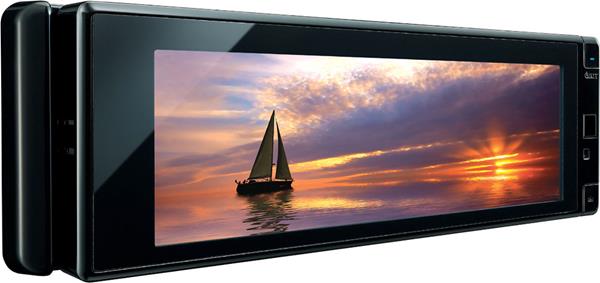
The KD-AVX77 wastes no space on its single-sized face — it's dominated by the 5.4" wide-angle touchscreen. The controls disappear when you're not using them, then light up automatically when your hand approaches the screen. You make all adjustments with a touch of your finger.
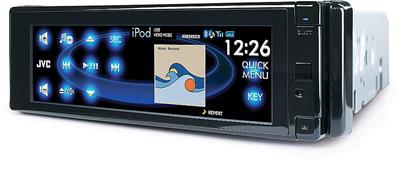
Pick from four viewing modes, including an ultra-wide Cinemascope setting for watching DVDs when you're parked. Split-screen mode is perfect for viewing album art and song info while you're listening to music. Choose from different menus configurations and colors to suit your taste and match your vehicle's interior — you can even use your own jpeg pictures as wallpaper.
First-class sound
Play the MP3, WMA, and AAC files you've burned to a disc or saved on a thumb drive. The powerful built-in amplifier and 24-bit digital-to-analog converter make the most of your music, and the 7-band equalizer lets you adjust a range of frequencies to create the perfect sound for your car's interior. If you're building a complete audio/video system, the 6-channel preamp outputs let you add amplifiers, subwoofers, and even a center speaker.
Movie theater on wheels
Watch DVDs on the widescreen display up front while you're parked, or connect a screen in the back so your passengers can watch while you drive. Dual-zone mode lets you enjoy your favorite driving music up front while they watch in back. And a built-in 5.1 surround sound decoder lets you hook up real movie theater surround sound in the back for a truly rewarding movie experience.
iPod ® and Bluetooth®
Built-in iPod controls keep your favorite playlists on tap, and you can even stream your iPod videos by adding an adapter. If you have a Bluetooth enabled phone, the receiver's built-in Bluetooth capabilities let you take your phone calls through the receiver while you keep both hands on the wheel.
Bluetooth note: Bluetooth compatibility of this device may vary, depending on your phone and service provider.
Note: If you're going to use your iPod with this receiver, be sure to check "Details" for specific iPod model compatibility with this receiver or its optional iPod adapter.
Want to keep your car's steering wheel audio controls?
In most vehicles, you can use this adapter to connect your vehicle's steering wheel controls to this JVC stereo. Connect a few wires, then program the adapter for your particular car and the JVC, and you'll retain the convenience of your steering wheel controls.
Product highlights:
General features:
- DVD receiver with built-in MOSFET amplifier (20 watts RMS CEA-2006/50 peak x 4 channels)
- plays DVDs, DVD-Rs, DVD-RWs, CDs, CD-Rs, CD-RWs, and MP3, WMA, and AAC files on CD
- "blackout" touchscreen face with 5.4" video screen and motion-sensing activation
- remote control
Audio features:
- iEQ 7-band equalizer with nine presets
- 24-bit digital-to-analog converter
- built-in 5.1 decoder
Expandability:
- built-in iPod control, adapter required for iPod video display
- built in Bluetooth
- compatible with optional satellite radio, HD Radio tuner
- inputs: rear USB input on cable, rear A/V input
- outputs: 6-channel preamp outputs (5-volt front, rear, center, and mono subwoofer), video output
Other info:
- compatible with most factory steering wheel audio controls (adapter required)
- CEA-2006 compliant
- warranty: 1 year
- MFR # KD-AVX77
What's in the box:
- AM/FM/CD/DVD receiver
- 15-amp mini fuse (installed)
- Sleeve
- Face
- Hard plastic face case
- Trim ring
- Wiring harness
- Wireless remote control (RM-RK252)
- 2 "AAA" batteries
- Microphone with attached 12' cord terminated by a right-angle male 3.5mm connector
- Visor clip
- Self-adhesive mounting bracket
- 2 Radio removal tools
- Rear mounting bolt
- Flat washer
- Rubber bushing
- Hex flange nut
- Red wire splice tap (18-22 gauge)
- Face security screw
- Instructions (Eng/Spa/Fre)
- Installation/Connection Manual (Eng/Spa/Fre)
- Bluetooth information sheet
- US warranty information
- Canadian warranty information
- Product Registration Card/Questionnaire
- Caution sheet concerning ground wire (attached to wiring harness)
- "Caution when installing" note
- Face security screw instructions
- Digital Television Transition Notice
Featured video:
Customer reviews for JVC KD-AVX77
Loading...
Loading reviews...
Average review:
4.5 out of 5 starsThanks for submitting your review
Customer photos


This review was collected as part of a promotion
Pros:
Cons:

More details on the JVC KD-AVX77

Features & specs
| Expandability | ||
|---|---|---|
| AUX Input | Optional | |
| Audio/video Input | 1 | |
| USB Input | Rear | |
| USB Port Power | --- | |
| Backup Camera Input | Yes | |
| Second Camera Input | No | |
| CarPlay | No | |
| Android Auto | No | |
| Siri Control | No | |
| Alexa Voice Control | ||
| Android Control | No | |
| Memory Card Slot | USB memory | |
| Bluetooth Compatible | Built-in | |
| Satellite Radio Ready | Both | |
| HD Radio | No | |
| Navigation | No | |
| iPod Compatibility | ||
| Full size | Classic/5Gen | |
| Nano | Nano6/Nano5/Nano4/Nano3/Nano2/ | |
| Touch | Touch4/Touch3/Touch2/Touch1 | |
| iPhone | Phone/Phone3G/Phone3GS | |
| General | ||
| RMS Power (CTA-2006) | 20 watts | |
| RMS Power (Manufacturer) | --- | |
| Peak Output | 50 watts | |
| RMS Power Bandwidth | 20-20kHz | |
| Preamp Outputs | 6-channel | |
| Sub Preamp Outputs | Yes | |
| Switchable Rear Preamp Outputs | No | |
| Video Screen | Yes | |
| Navigation App Compatible (iOS) | ||
| Navigation App Compatible (Android) | ||
| Preamp Voltage | 5 volts | |
| Screen Size | 5.4 | |
| Screen Type | Basic (Resistive) | |
| Display Color | ||
| Key Button Color | Blue | |
| EQ Bands | 7 | |
| Wireless Remote | Yes | |
| Steering Wheel Control Compatible | Yes | |
| Parts Warranty | 1 Year | |
| Labor Warranty | 1 Year | |
| Tuner | ||
| FM Sensitivity | 9.3 dBf | |
| European Tuning | Yes | |
| Seek/Scan | Seek | |
| Radio Data System | No | |
| File Playback | ||
| Music File Playback | MP3, WMA, AAC, WAV | |
| High-res Playback | ||
Product Research
Display
Features
Audio Section
Radio Functions
Disc Playback
USB/iPod Connectivity
AV Connections
Bluetooth/Remote Control
Display Features
Detachable Front-Panel With Integrated 5.4" Touch-Screen Monitor: The KD-AVX77 features an integrated 5.4" TFT Active Matrix, super-wide (3.32:1) LCD display. The pixel resolution of the display is 2400 horizontal x 240 vertical (576,000 pixels total). The touch-screen LCD serves as a video monitor, system information display, and control panel. The KD-AVX77 front-panel and integrated 5.4" LCD monitor electronically slide-down to insert and eject your CD/DVD discs. The motorized display can be tilted (up) to one of four angles for your viewing pleasure. The JVC head unit's front-panel display is also detachable and comes supplied with a hard-plastic face case for when the faceplate is detached.
Proximity Sensor Touch-Screen Control: The JVC KD-AVX77' LCD touch-screen control panel features a proximity sensor which allows the touch-screen controls to illuminate when you move your hand close to the head unit's front-panel or turn off when there is no operation for approximately 10 seconds. You can set the unit's motion sensitivity to Mid or High. The touch-screen controls are turned on in the following cases - When you move your hand close to the touch-panel controls, When your finger touches the touch-screen controls, When you use the remote controller, When a call/text message comes in, or When the signal from an optional rear view camera comes in.
Dual Display: A playback picture and the navigation screen or rear-view screen (navigation unit and rear-view camera sold separately) can be displayed at the same time on the unit's 5.4" touch-screen LCD monitor.
LCD Monitor Settings: The unit's touch-screen LCD monitor features the following customized settings.
- Wallpaper/Color: You can select the background picture of the monitor from four preset settings Ring, Plain, Road, Night; or capture up to a images shown on the screen to display as a custom background. You can also adjust the color of the background from Blue, Black, Orange, Red, Green, or Yellow.
- Text Color: You can select the text color of the display from White, Black, Red, Green, Blue, Yellow, Orange, or Purple.
- Picture Adjustment: The LCD monitor's Brightness, Contrast, Color, and Tint can each be adjusted from -15 to +15.
- Selectable Aspect Modes: You
can choose from various aspect modes for the in-dash display:
- 16:9 Full: suitable for 16:9 images
- Ultra Full: stretches the picture display to the width of the screen
- Cinema Scope: suitable for cinemascope-size images
- Ultra Cinema Scope: stretches the picture displayed in cinemascope-size to the width of the screen
- Zoom: suitable for 4:3 letterbox images.
- Auto: the correct aspect mode is automatically chosen based on the disc
- Dimmer: When 12 volts is applied to the illumination lead and the dimmer set to Auto, the display dims. The dimmer can also be set to Off (normal brightness at all times), On (display is always dimmed), or Dimmer Time Set (you program the time for the dimmer to turn off an on).
Parking Brake Detection: To prevent the displaying of video while the vehicle is in motion, the green wire in the supplied 16-pin harness must be connected to the vehicle's parking brake detection circuit, as well as a constant power source and ground. While the vehicle is in motion (parking brake off), you can still view all of the other displays and menus.
Audio Connection
Amplifier Gain Control: When you are using the KD-AVX77 with factory speakers (or those rated to less than 50 watts peak), the Amplifier Gain Control can limit the amount of power being sent to those speakers. When the Amp Gain Control is set to low, the volume control ranges from 0 (minimum) to 30 (maximum). When using speakers rated higher than 50 watts peak, you can set the Amp Gain Control to high, and the volume control will range from 0 to 50. The internal amp can also be turned of when all the speakers are powered by outboard amplifiers.
6CH 5V Preamp Outputs With Built-in Crossover: The unit has six 5-volt preamp outputs (stereo Front and Rear, Center, and mono-Sub). The front and rear preamp output feature fade controls while the center and subwoofer preamp outputs are non-fading. The subwoofer output has independent level control, adjustable from -6 to +8. You can also adjust the unit's built-in crossover frequency between the front/rear speakers and the subwoofer output from 80, 120, or 150Hz.
5.1-Channel Decoding: You can enjoy 5.1-channel sound with the built-in surround processor, including Dolby Digital and Dolby ProLogic II (movie and music). In addition to the front and rear speaker outputs, the unit features preamp outputs for front left and right, rear left and right, center, and subwoofer. Dolby ProLogic II Music also has adjustments for Panorama (depth) and Center Width.
Speaker Adjustments: The KD-AVX77 features the following speaker adjustments to customize your car audio experience.
- Speaker Size: Like home surround receivers, you can
adjust the following speaker size settings:
- Front: Small or Large
- Center: Small, Large, or None
- Rear: Small, Large, or None
- Subwoofer: On or Off
- Speaker Level: You can adjust the output level of each individual speaker relative to the main volume from -10 dB to +10 dB.
- Speaker Distance: You can adjust the speaker output timing separately for each individual speaker (excluding the subwoofer) according to the distance from the speakers to the listening position. The distance for each speaker can be adjusted from 6" to 240" in 6" increments.
7-Band Equalizer: Along with a flat preset, there are eight preset EQ curves and three user programmable fields; Hard Rock, R&B, Pop, Jazz, Dance, Country, Reggae, Classic, User 1, User 2, and User 3. The user presets can be adjusted to your preference and stored in memory. For each User preset, you can independently adjust the following frequencies: 60 Hz, 150 Hz, 400 Hz, 1 kHz, 2.5 kHz, 6.3 kHz, and 15 kHz. The level of each frequency can be adjusted from -10dB to +10dB in 2dB increments.
D. Range Compression: This feature allows you to enjoy a powerful sound at low or middle volume levels while playing back a disc with a Dolby Digital soundtrack. The KD-AVX77 compresses the volume range between the loudest and softest audio sections of the disc
Source Volume Control: The volume of each source (other than FM radio) can be adjusted relative to the FM volume, so the level is constant as you change from one input to another.
Dual Zone Operation: You can enjoy disc playback from a connected external monitor and pair of wireless headphones (both sold separately), while listening to any source (other than USB), through your vehicle's speakers.
Note: When Dual Zone is in use, you can only operate the built-in DVD/CD player using the supplied remote control.
Radio Functions
AM/FM Tuner With Title Assignment: The KD-AVX77 features a built-in AM/FM tuner with three FM bands and one AM band. Each AM/FM band can hold up to six station presets. You can store these presets manually or have the radio store them automatically. You can also assign names (up to sixteen characters) for 30 AM/FM station frequencies. If an FM stereo broadcast is hard to receive, you can manually switch the tuner to Mono operation. You can also switch the tuner's IF filter to Wide or Auto to increase/decrease the sensitivity.
Source Naming: The KD-AVX77allows you to assign names of up to 16 characters each for the A/V input, the EXT input (connected to the CD changer input using an optional adapter), and up to 30 AM and FM stations.
Satellite Radio Ready: There are several options for connecting an optional XM or SIRIUS Satellite Radio receiver to this receiver:
- XM Satellite Radio: To receive XM Satellite Radio connect the optional CNP2000UCA XM Tuner and the JVC CNP-JVC1 adapter cable (700XMJVC2, sold separately).
- SIRIUS: The head unit is compatible with the
SiriusConnect Universal Tuner and Plug & Play Dock.
- SiriusConnect Tuner: Connect the optional SC-C1 SiriusConnect vehicle tuner and the JVC KS-SRA100 SIRIUS adapter (700SIRJVC1, sold separately).
- SiriusConnect Dock: Select dock-and-play and portable SIRIUS radios can be controlled using the JVC KS-SRA100 SIRIUS adapter (105KSRA100) and the SC-VDOC1 dock (607SCVDOC1); both sold separately.
- Auxiliary Input: A portable satellite radio receiver, such as the XM Delphi SkyFi3 or SIRIUS Sportster, can be connected to the head unit via the rear A/V input or a JVC auxiliary input adapter, such as the KS-U57 or KS-U58.
Disc Playback
Disc Types: The KD-AVX77 supports the following disc types: DVD Video, DVD-R/RW, DVD+R/RW, Video CD, CD Audio, and CD-R/RW discs.
MP3/WMA/AAC/WAV Playback: The KD-AVX77 can play MP3 (32-320kbps)/WMA (32-320kbps)/AAC (16-320kbps)/WAV (16-bit) audio files that have been recorded on CD-R/RW, DVD-R/RW and DVD+R/RW discs. The disc must be recorded in one of the following formats: ISO 9660 Level 1/Level 2, Joliet, or Romeo. Each disc can have a maximum of 8 folder hierarchies, 250 folders, and 5,000 files (maximum of 999 files per folder). The unit also supports IDTag3 (version 1.0, 1.1, 2.2, 2.3 or 2.4) for album and artist information from MP3, WMA, WAV, or AAC files. The unit can recognize a total of 25 characters for file/folder names.
MPEG/JPEG Playback: This unit can play back MPEG1/MPEG2 Video files with the extension code <.mpg>, <.mpeg>, or <.mod> recorded on DVD-R/RW, DVD+R/RW, or CD-R/RW discs. The KD-AVX77 can support video with a maximum bit-rate of 4 Mbps. This unit can also play back JPEG still image files with the extension code <.jpg> or <.jpeg> recorded on DVD-R/RW, DVD+R/RW, or CD-R/RW discs. The head unit can support JPEG still images that are at 32 x 32 to 8192 x 7680 resolution.
USB/iPod Connectivity
USB Input: A USB port is attached to the rear panel by a 46" cable. This allows you to play USB mass storage device (USB thumb-drive, Digital Audio player, or portable HDD) loaded with MP3/WMA (32-320kbps), AAC (16-320kbps),WAV (16-bit), MPEG1/MPEG2 (average 4 Mbps), or JPEG (up to 8192 x 7680 pixels) files. For the unit to recognize the USB medium, it must be specified as a mass storage device formatted using FAT 12, FAT 16, or FAT 32. The unit can recognize a total of 5000 files and 250 folders (a folder may contain a maximum of 999 files). This unit will recognize a total of 25 characters for file/folder names.
Note: This unit cannot recognize a USB device whose rating is other than 5V and exceeds 500 mA.
iPod/iPhone Compatible: The optional JVC KS-U30 USB Audio And Video Cable For iPod (105KSU30, sold separately) allows you to playback and control audio/video from your iPod on this JVC multimedia head unit. This cable also allows you to view iPod Artwork. You can search for music by Playlist, Artist, Album, Song, Podcast and Genre. You can also select Repeat (One/All) and Random (Song/Album) modes. The KS-U30 cable will also charge your iPod or iPhone when connected to the JVC head unit and is powered on. To playback video the KD-AVX77's Video Input must be set to "iPod" in the unit's menu. The cable features a proprietary Apple iPod dock connector on one end and a male composite video and male stereo audio RCA connectors on other end along with a USB type-A connector. You can also connect your iPod's USB/Docking cable to the unit's USB port for audio only playback from your iPod. When using a USB/iPod cable or the JVC KS-U30 USB audio/video iPod cable, you can choose to control your iPod from the KD-AVX77 or your iPod's click-wheel or touch-screen (except for the iPod nano 1st gen and iPod video 5th gen). The JVC KD-AVX77 is "Made for iPod/iPhone" compatible and supports the following iPod/iPhone model features, using the optional KS-U30 cable (as of Dec. 2009):
| iPod/iPhone Model | Generation | Media Type | Control Type | Display Type | Charge | |||
|---|---|---|---|---|---|---|---|---|
| Audio | Video | head unit | iPod/iPhone | Song/Artist Text | Track Info | |||
| dock connector | 3rd | N | N | N | N | N | N | N |
| clickwheel color | 4th | N | N | N | N | N | N | N |
| mini | 1st | N | N | N | N | N | N | N |
| 2nd | N | N | N | N | N | N | N | |
| video | 5th | Y | Y | Y | N | Y | Y | Y |
| classic | 80GB | Y | Y | Y | Y | Y | Y | Y |
| 120GB | Y | Y | Y | Y | Y | Y | Y | |
| 160GB | Y | Y | Y | Y | Y | Y | Y | |
| nano | 1st | Y | N | Y | N | Y | Y | Y |
| 2nd | Y | N | Y | Y | Y | Y | Y | |
| 3rd | Y | Y | Y | Y | Y | Y | Y | |
| 4th | Y | Y | Y | Y | Y | Y | Y | |
| 5th | Y | Y | Y | Y | Y | Y | Y | |
| 6th | Y | N | Y | Y | Y | Y | Y | |
| touch | 1st | Y | Y | Y | Y | Y | Y | Y |
| 2nd | Y | Y | Y | Y | Y | Y | Y | |
| 3rd | Y | Y | Y | Y | Y | Y | Y | |
| 4th | Y | Y | Y | Y | Y | Y | Y | |
| iPhone | 2G | Y | Y | Y | Y | Y | Y | Y |
| 3G | Y | Y | Y | Y | Y | Y | Y | |
| 3GS | Y | Y | Y | Y | Y | Y | Y | |
| 4 | Y | Y | Y | Y | Y | Y | Y | |
Note: Apple iPod/iPhone software updates may change functionality results. If you download a newer software version, you may need to reset the head unit and your iPod/iPhone to regain functionality. If this doesn't work, you may need to revert to the older software version or wait until an newer software update is available.
AV Connections
Audio/Video Input: The audio/video input consists of left and right RCA audio jacks and an RCA composite video jack, allowing you to connect external equipment to this head unit. The audio/video input can be set to one of the following modes:
- Off: when nothing is connected
- Audio + Video: choose when connecting an A/V component like a VCR
- Audio: choose when connecting an audio component like a cassette deck
- Camera: when a rear view camera is connected (the unit features a reverse gear signal wire {purple/white}, that when hooked up will switch the KD-AVX77's display to the rear-view camera input)
- Navigation: displays map from an outboard navigation system
- iPod (Off): select when connecting your iPod using the optional USB Audio/Video iPod cable (105KSU30)
A/V Output: The head unit features a composite video output terminal, along with a pair of stereo RCA outputs, to output an audio/video signal to an external monitor for second zone capabilities. You can choose one of the following monitor types for the output to the external monitor.
- 16:9: select this when the aspect ratio of your monitor is 16:9
- 4:3 Letter Box: select this when the aspect ratio of your monitor is 4:3, when viewing a widescreen picture black bars appear on the top and bottom of the screen
- 4:3 Pan Scan: select this when the aspect ratio of your monitor is 4:3, when viewing a widescreen picture, the black bars do not appear; however, the left and right edges of the picture will not be shown on screen
Optional Input Adapter: An optional JVC Line Input Adapter (105KSU57 or 257KSU58, both sold separately) may be used to provide an auxiliary audio only input on this unit. This feature allows you to connect a portable audio player, such as a portable MP3 player, to this unit as an additional audio source. The adapter connects to the CD changer input on this unit. When the adapter is connected to this unit, a CD changer cannot be connected.
Bluetooth/Remote Control
Built-In Bluetooth: The KD-AVX77 has Bluetooth hardware built in to integrate with Bluetooth enabled cellular phones and audio players. Bluetooth is a two-way wireless communication system allowing you to make and receive cell phone calls, and listen to a Bluetooth audio device. The head unit comes with an external microphone to speak into, while the other party is heard through your vehicle's speakers. This unit supports the following Bluetooth profiles - HFP 1.5 (Hands-Free Profile), OPP 1.1 (Object Push Profile), A2DP 1.2 (Advanced Audio Distribution Profile), and AVRCP 1.3 (Audio/Video Remote Control Profile). Up to five devices total can be registered with the KD-AVX77 (only one can be used at a time).
- Phone: The unit can be set to automatically connect to a registered phone when it's turned on. Once the phone connection is made the head unit is ready to receive calls while you listen to other sources. You can store up to 6 phone numbers as presets for one-touch dialing, dial from your Phonebook, dial from the list of received or missed calls, or enter the phone number manually. Voice activated dialing is available if your phone is also equipped. You can answer incoming calls manually or automatically, or set the unit to automatically reject all incoming calls.
- BT Audio: In addition to Bluetooth phones, the KD-AVX77 supports Bluetooth equipped audio players. You can connect wirelessly and listen to the player, and in some cases control the player as well.
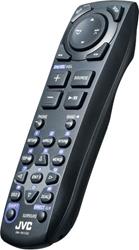
Remote Control: The JVC DVD/CD receiver comes supplied with an IR wireless remote (RM-RK252) control for full wireless operation of the KD-AVX77.
OEM Steering Wheel Remote Compatible: The unit also features an OEM steering wheel remote control input on the rear of the unit to allow you to keep your vehicle's radio steering wheel remote controls when used with the optional PAC SWI-JACK Steering Wheel Control Interface Adapter (127SWIJACK, sold separately); or the optional Metra ASWC Steering Wheel Control Interface Adapter (120ASWC, sold separately).
Note: Please consult the Crutchfield Car Selector to see if your vehicle is compatible.
Loading...
Loading accessories...
Customer Q&A
Loading...
Loading articles...

5/5, if looks AND performance are important, buy this one. The touch screen is super clean, and doesn't make the dash of your car look cheap w/ a bunch of crazy lights and knobs. So many extras and options, you will not be disappointed.
Carl from Chicago