Bluetooth protocols and codecs explained
Understanding the ABCs of Bluetooth in your car

Bluetooth® connectivity is quite handy in the car. It lets us stream music, take calls, and more. But Bluetooth devices often include a lot of strange jargon, like HFP and L2DP. In this article, we'll explain what all of the acronyms mean and maybe introduce you to some extra things that you didn't know Bluetooth can do.
Bluetooth wireless technology is a natural for the car. Most people know that by "pairing" (wirelessly connecting) their phones with their car stereo, they'll be able to engage in hands-free calling. However, Bluetooth connectivity also opened up a whole new world in the car by letting us enjoy our music without having to plug in.
It does all this by opening up a 2-way line of communication between your smartphone and your stereo, letting them have a conversation. You just need to make sure they can speak the same languages.
The easiest way to make sure your phone and stereo do the things you want — like playing music, answering calls, and supporting voice control — is to see if each one is compatible with certain specific Bluetooth protocols and “codecs” for audio streaming. The easiest way to do that is to check your phone and the car stereo you’re considering for the following factors. We can help.
Codecs for the best wireless streaming sound
It’s easy to get swept away in jargon, but a Bluetooth “codec” is essentially software that encodes and decodes digital audio data and determines how it’s transmitted from a source, like your phone, to a device such as a car stereo.
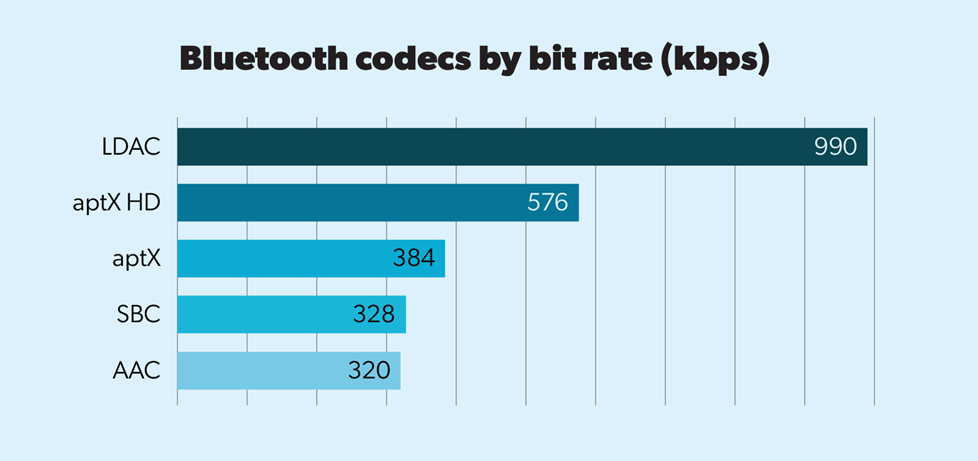
Whether it’s music we own or tunes we stream from music services, we just want the best sound from our music. This is why many companies have introduced codecs that let listeners easily pair their devices and retain higher fidelity sound from their music.
Here’s a quick rundown of some prominent audio codecs in our car stereo lineup:
- AAC – This is the codec that Apple uses, like the iPhone® and iPad®. While its sampling rate and maximum bit rate numbers are slightly lower than basic Bluetooth, AAC actually offers solid sound quality while keeping file sizes relatively small. AAC is also capable of handling higher bit rates from services like TIDAL or stored high-res files, which allows you to achieve better audio quality despite wireless-streaming compression.
- LDAC – This Sony proprietary codec offers sampling and maximum bit rates approximately three times the size of basic Bluetooth requirements. This means it can preserve much of the music detail that’s lost in other, more compressed formats. LDAC is supported in many Android™ phones, as well as in other Sony devices, like their portable digital music players and headphones.
- aptX/aptX HD – While it doesn’t appear in many car stereos, QualComm’s aptX codec similarly creates a Bluetooth sound that approaches CD quality and can extend the wireless range with some products — handy for home audio gear where there are greater distances between devices.
There are also rumors of new codecs on the way in the future, so we’re excited to see how Bluetooth audio continues to improve.
Other protocols that help with music, audiobooks, and podcasts
A Bluetooth device’s Advanced Audio Distribution Profile (A2DP) creates a "Source/Sink" relationship between your phone and your stereo, in which your phone, the source, sends signal to your stereo, the sink. A2DP is also used in products such as wireless headphones and wireless speaker systems.
The Audio/Video Remote Control Profile (AVRCP) allows control from your stereo over the content you’re playing from your phone or device, including songs or podcasts from a variety of audio content apps. Think of it as a TV remote control, where your car stereo's buttons or touchscreen can play, pause, and skip back and forth between tracks.
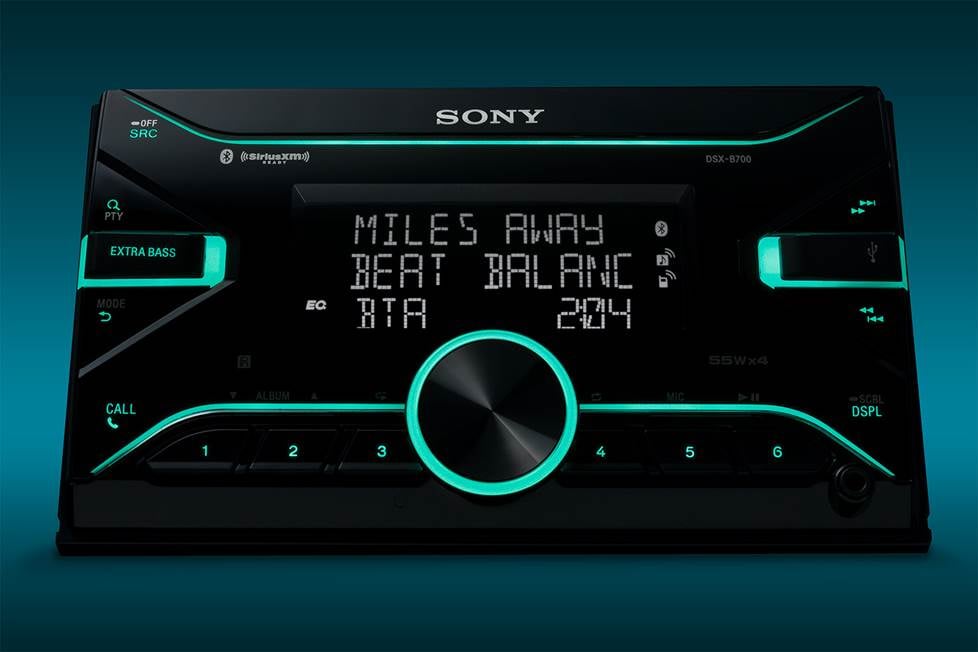
One of the neat things about connecting your smartphone to your stereo is that it’ll send "metadata" — song, artist, and album title info — to the display. Whether you're playing music from a music app or directly from music stored on your device, AVRCP also lets you see what's playing at all times.
Speaking of apps...
Many car stereo manufacturers offer their own apps that you can load to your phone. They typically include controls and metadata on your phone's screen similar to what you'll see on the stereo's display. This is great for situations where you're not within reach of the stereo, like in an RV or on a boat.
Some of these apps let you dive deeper into other features, such as an equalizer for quick tweaks while you're jamming. Pretty cool stuff! Any guess on how that's possible? Yup, it's because the stereo and phone are linked by Bluetooth.
If you're thinking about using a manufacturer's app with a new car stereo, you can search the "Details" tab for the stereo on our site. Then, check out the app store for more information about its functionality.
[Shop for car stereos with Bluetooth connectivity]
Let's talk hands-free calling
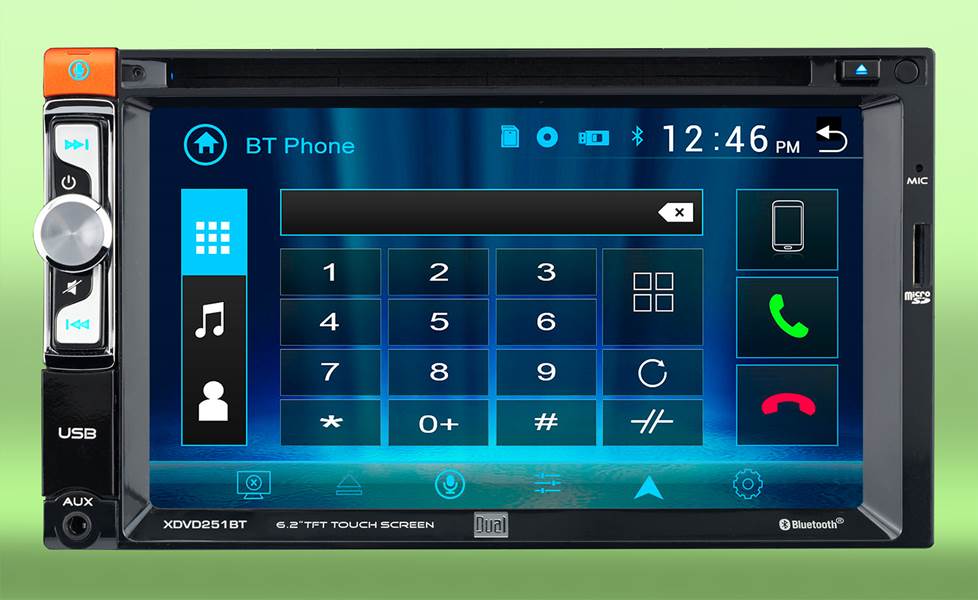
Before the popularity of streaming music, most folks got Bluetooth in their car for the Hands-Free Profile (HFP), which lets you make and take calls without having to touch your phone. HFP is the same protocol used by Bluetooth headsets for hands-free calling. In many states, drivers are legally not supposed to have their smartphone in their hands while driving, which makes Bluetooth even more crucial.
The advantage of having a car stereo that works with the hands-free profile is that incoming numbers show up on the stereo’s display, and you hear your callers over your car’s speakers.
Some stereos feature built-in microphones; others come with external microphones that you mount somewhere close to you, like on the sun visor or steering column, then plug into the back of the stereo. Most of the time, an external mic mounted on your steering column or sun visor will perform better than a microphone in the stereo's faceplate.
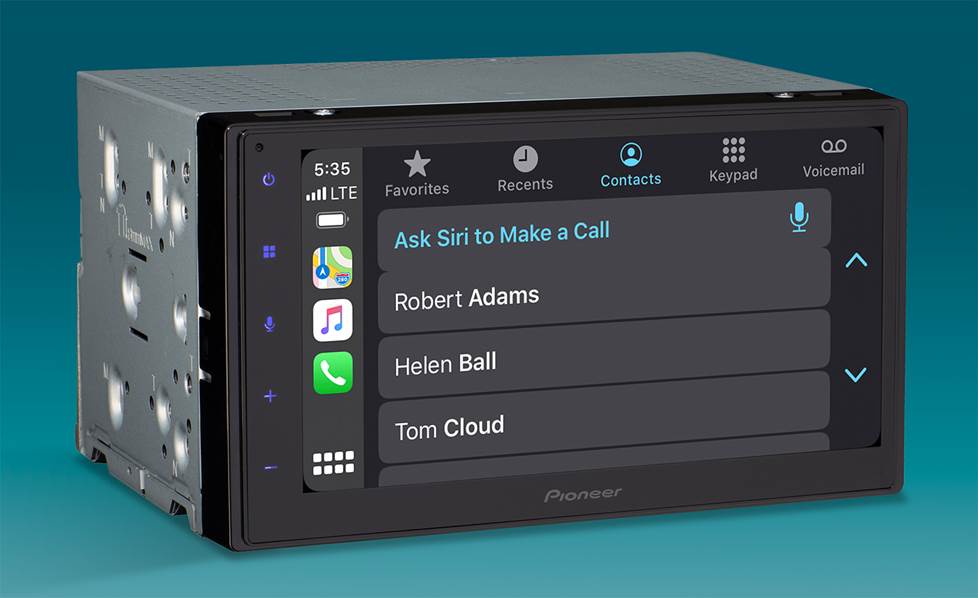
Having your stereo access your contacts with the Phone Book Access Protocol makes it easier to place calls in the car.
Access to your phone's contact list
Hands-free calling wouldn’t be quite as convenient if you had to use your phone to manually pull up your contacts. Fortunately, Bluetooth can help in two ways.
The first, and most basic, is with Object Push Profile (OPP). This protocol lets you upload your contacts from your phone to your stereo. How the process works varies by stereo and phone, but basically, you set up a push/pull relationship between your phone and your stereo. You ask your stereo to "pull" the contacts from the phone, while telling your phone to "push" the info to your stereo. Your stereo will also have a limit on the number of contacts you can upload.
The more advanced Phone Book Access Profile (PBAP) lets your stereo tap into your phone’s contacts instead of uploading them. The process typically initiates itself automatically, and usually goes like this: once your stereo and phone are paired, your stereo will ask your phone, "Hey, may I take a peek at your contacts?" Your phone will reply, "I'm not sure, let me check." You'll then get a message from your phone telling you that your stereo is asking to connect with its contact list. All you have to do is approve, and your contacts will show up on your receiver's screen. This makes placing calls much easier.
[Shop for car stereos with Bluetooth connectivity]
How Crutchfield can help check compatibility
The key to enjoying the benefits of wireless connectivity is to make sure that your phone and your new stereo are compatible with the same codecs and protocols. When streaming music is a priority for you, Crutchfield makes the search simple by including online filters for Bluetooth audio codecs (like LDAC, AAC, and aptX). That way, you can choose a stereo that matches your device’s capabilities.
And if you really want to dig into more info, check in the stereo's "Details" tab. And remember, for a particular feature to work, both your phone and your stereo need to be compatible with the necessary protocol. So read up, decide what you want, and then get shopping for the car stereo that's right for you.
[Shop for car stereos with Bluetooth connectivity]
Ready for some wireless goodness?
We hope this article has given you a better understanding of how Bluetooth works. Knowing what to look for in phones and car stereos will help you shop with confidence.
If you have any questions or just need a little help choosing the stereo that's right for you, contact one of our advisors.



David from Greenville
Posted on 11/29/2024
Very helpful.
Jake from Phoenix
Posted on 11/25/2023
When Bluetooth is activated on my iPhone, am I able to adjust the volume of the music being played? Also, is there a wired remote that is used with the stereo? My location will be unavailable to use the IR type remote since there is no line of sight.
Dominic DeVito from Crutchfield
on 11/27/2023
Brian Hatt from Greenville
Posted on 10/25/2023
My girlfriend and I share the truck and curious how you cycle through the source between my iPhone and her android on the JVC KX-850bts? Is there an "EASIER" way? Thank you
Dominic DeVito from Crutchfield
on 10/26/2023
Ray
Posted on 8/17/2023
How does the bluetooth version come into play eg. Bluetooth 4.2 vs Bluetooth 5.0
Dominic DeVito from Crutchfield
on 8/18/2023
Don Foley from Manchester
Posted on 3/27/2023
Thank you crutchfield
Donald Drach from Davenport
Posted on 10/16/2022
I have a sena in my helmet and an android phone. I want the three to work together seamlessly, is that possible with a system like this?
Dominic DeVito from Crutchfield
on 10/17/2022
Debbie Taylor from Collinsville
Posted on 8/1/2022
Help. I have the Deh-x8600bh in a car I just purchased. I have an android phone. My pairing for music via pandora is fine but I'm having trouble with the bt phone function. I get calls and can hear the caller but they can't hear me. How do I correct this?
Dominic DeVito from Crutchfield
on 8/2/2022
John jones from Atlanta
Posted on 4/28/2022
Where do I find my Bluetooth pin to connect to my stereo.
Dominic DeVito from Crutchfield
on 4/29/2022
Bryan Parrish from bridgewater
Posted on 11/26/2021
Thank you for helpful information
Bryan Parrish from bridgewater
Posted on 11/26/2021
Thank you for helpful information