JBL Tour Pro 3 headphone review
Bigger touchscreen, more features, and better sound

F
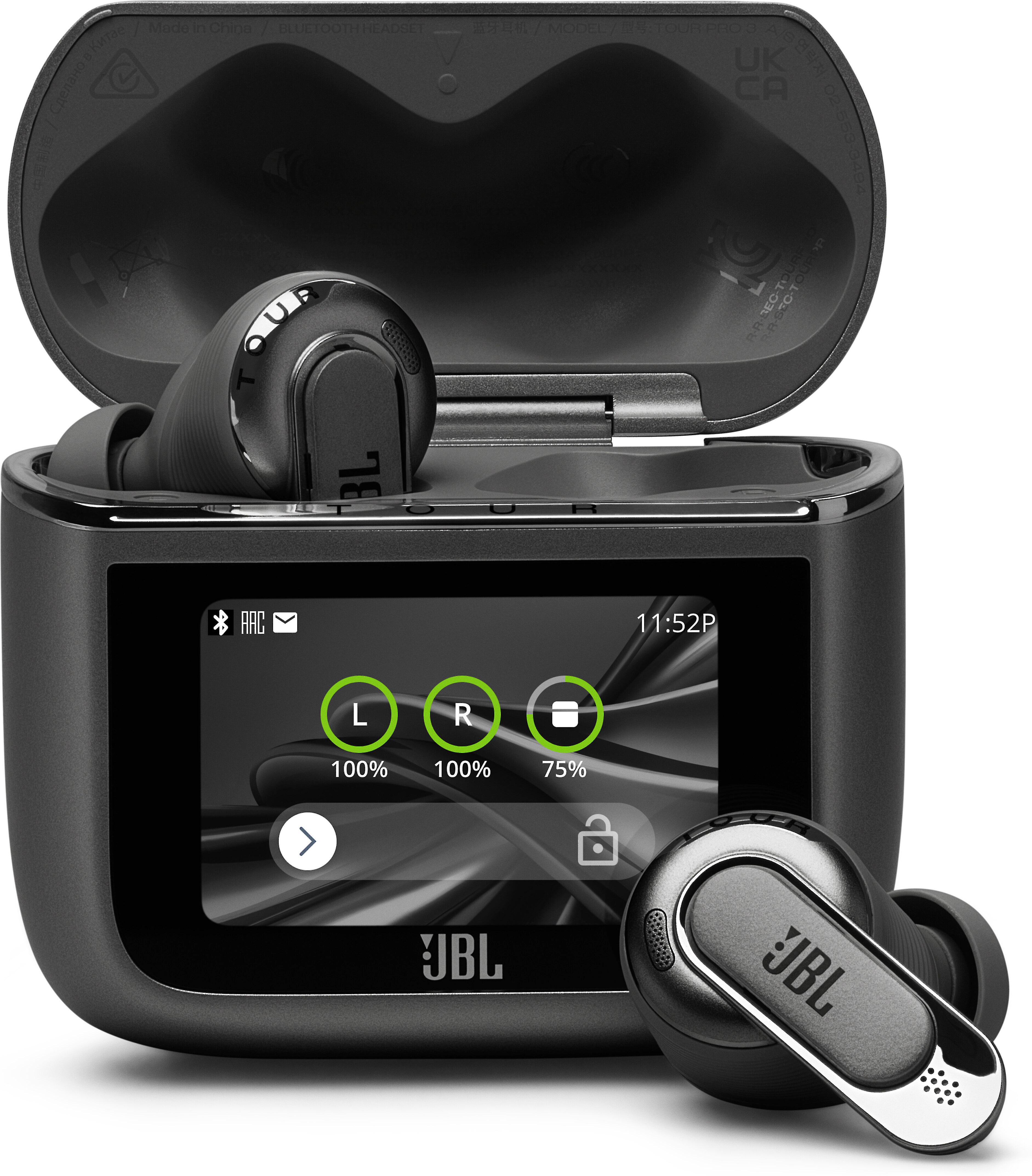
or the JBL Tour Pro 3 wireless earbuds, the state-of-the-art touchscreen case grabs all the attention and headlines. But it’s their performance, comfort, and a kitchen-sink set of features that elevate them from “neat gimmick” to game changer.
And one of the best sets of all-purpose headphones I’ve ever tried.
Do you need a touchscreen case?
Let’s talk about that eye-catching case. I was skeptical the first time I tried a JBL touchscreen case, back when it debuted with the previous-generation Tour Pro 2. Sure, it looks cool, but is it necessary? I mean how many more screens do we need in our lives? And you have several other ways to control the earbuds without it.
A specific moment won me over.

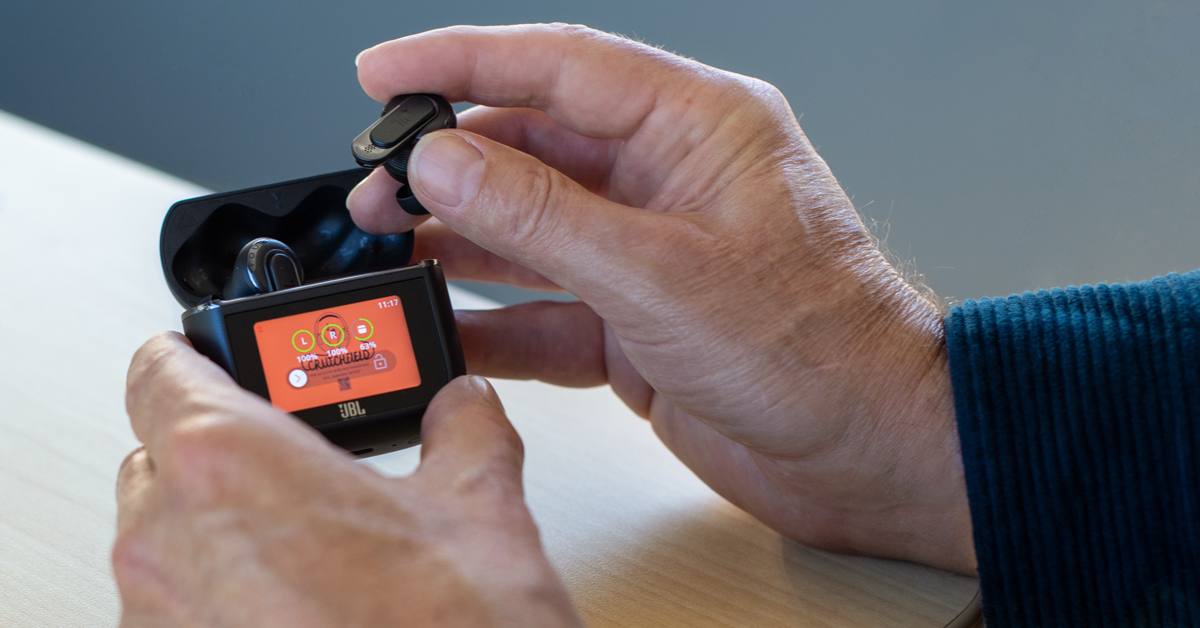
JBL's "Smart Charging Case 2.0" offers touchscreen controls, so I could easily skip tracks, adjust the volume, and toggle between noise cancellation modes — even with my phone out of reach.
One morning on an Outer Banks vacation, I got up before all the kids, popped in the earbuds to listen to a podcast and made my coffee. Then I headed out to the deck to watch the sunrise over the ocean.
I wanted to quickly turn off the noise cancellation and use JBL's "Smart Ambient" feature to hear my surroundings. That's when I realized I had left my phone plugged in, recharging on the kitchen counter.
So, I grabbed the touchscreen case from my pocket, quickly swiped my thumb over to the noise cancellation controls, and toggled "Ambient Sound" on. The earbuds immediately let in the outdoor sounds, the sun started to creep up over the ocean, and I could soak in the whole scene.

On vacation, I used the smart case to quickly allow in ambient sounds without removing the earbuds. The crash of waves — and the entire scene — washed over me while my podcast kept playing.
Bigger case, more features
This time around, the screen is even larger — 30% larger to be exact. And the Tour Pro 3s offer even more control by tapping and scrolling with your thumb.
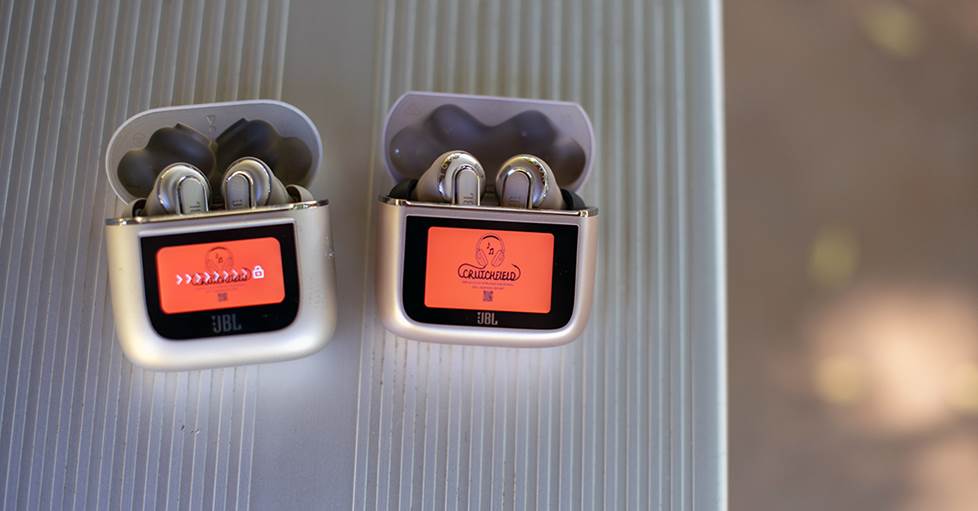
The Tour Pro 2 earbuds (left) were the first to feature a screen on the case and the JBL Tour Pro 3 (right) screen is 30% larger.
That’s saying a lot, because the JBL Tour Pro 2 earbuds were my “daily drivers” for well over a year. I grabbed them in the morning for podcasts and used them for walks, workouts, work meetings, and serious music listening. They did so much right that I thought it was a little too early for JBL to replace them. But the Tour Pro 3s add more functionality and sound even better while doing it.
Strong wireless connection with multipoint
The earbuds themselves connect to your phone via Bluetooth 5.4 — a newer, more reliable version of the popular wireless technology. This generation features Bluetooth LE Audio and LDAC, two codecs that allow for streaming with less compression on compatible devices.
Multipoint is on board, which lets you pair to two devices at once. That’s a game changer for work, where you can pair to your phone and laptop and quickly toggle back and forth. Then if you’re listening to music, you can take a phone call, or hop right on a Zoom meeting.
Fit and feel
Earbuds are only as good as their fit, both in terms of comfort and performance. With all the circuitry packed in, the overall design of the Tour Pro 3 earbuds is larger than most. But it was something I got used to quickly, so it didn’t feel overly cumbersome.
That might be because JBL goes out of their way to make sure you have the right size ear tips. There are five different sizes of silicone ear tips, including size XS for smaller ears. They also include one pair of malleable foam tips, which were my favorite of the bunch.
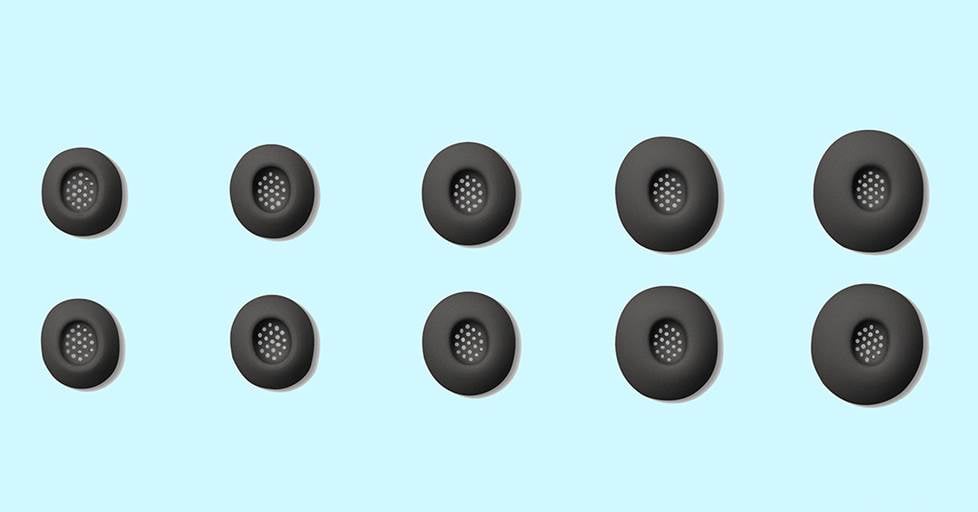
JBL includes five different sizes of silicone ear tips, including size XS for smaller ears (plus a set of foam tips).
They expand to create a seal that helps with noise cancellation and also helps reinforce bass response.
Noise cancellation that’s more adaptive and effective
JBL improved their adaptive noise cancellation, which was already very good. A series of built-in mics work together with newer algorithms to "read the room" then adjust the amount of noise cancellation in real time. I used them to mow the lawn, and could keep the volume at low levels and still hear podcast conversations clearly over the mower. At the office, it quieted a wide range of sounds — the HVAC system, loud discussions, the click-clacking of a co-worker’s mechanical keyboard — so I could focus on work.
I still have it a notch below the Sony WF-1000XM5s and Bose QuietComfort Ultra Earbuds — those two cancel noise better than any other earbuds. But that’s only one category and we’ll dive deeper into some comparisons a bit later on.
Strong battery life
You get up to eight hours of battery life with noise cancellation and up to 11 hours without. The charging case banks enough power fully recharge the earbuds about three times. And just 10 minutes in the case buys you enough power for about three hours of listening.
I used them often during work shifts, on walks, and while I was doing chores throughout the day — and never got to where I needed to recharge right away. And one of my favorite things is that the case shows the percentage of battery life left for each earbud and itself right on the lock screen display. I’ve actually gotten kind of spoiled by that when testing other headphones.
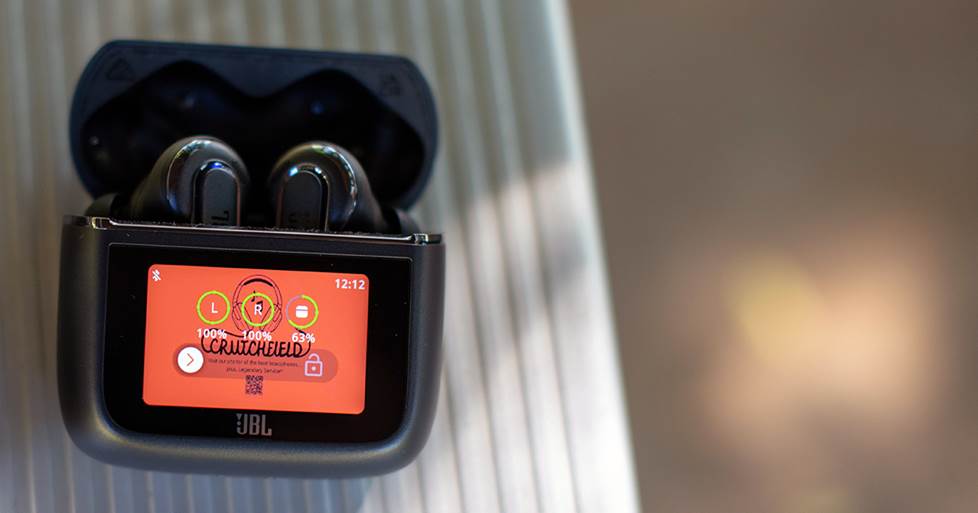
The case displays battery life right on the screen, so you can see it at a glance.
Several ways to control music and more
And there is a looooong list of controls and information available on the touchscreen. Some of these features work in concert with the JBL headphone app on your phone. I’d recommend downloading it, because it takes customization up a notch. But the case is ready to do a lot right out of the box.
The case let me play, pause, and skip tracks, adjust volume, select the level of noise cancellation or ambient sound, choose from different sound settings, and more.
I could swipe through a plethora of features and settings with my phone out of reach. There are also touch controls on the earbuds themselves for pausing the music or toggling between noise cancellation and ambient sound.
I found it a little strange that there was no touch control over volume, but I found myself using the case often anyway. I guess we just can’t get enough of our screens!
The phone app gave me more fine control over many of the features. It also includes JBL's Personi-fi 3.0 sound calibration. This process checks your fit and assesses your hearing profile, then tailors the sound accordingly.
And here’s a cool touch — you can customize the case’s wallpaper by adding an image or design from your phone.
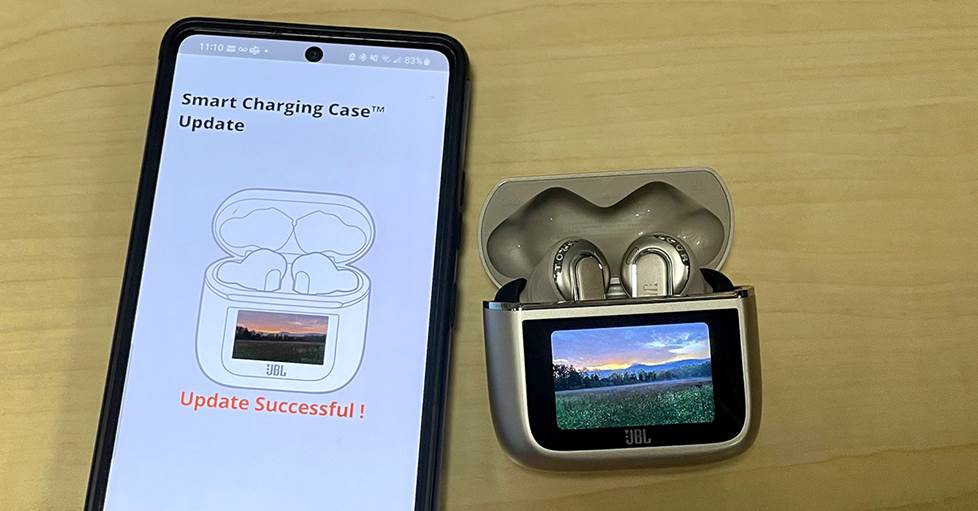
The JBL Headphones app also lets you further customize the touchscreen case — including adding your own screensaver image.
Travel-friendly design
One trade-off for having a case that does so much — it’s bulky compared to some of the sleeker charging cases out there, like the AirPods Pro 3 or the Sony XM5s. Still, if you’re taking the train or getting on or off a plane, you can just slip it right in your pocket or bag. I find it so much easier to travel with noise-canceling earbuds like these than over-ear headphones.
And how’s this for a travel hack? The charging case can double as a wireless audio transmitter. A USB-C to stereo mini cable is included. It helps connect the case to in-flight entertainment, a laptop, or anything else with a 3.5mm headphone jack. Then, the case sends audio signals wirelessly to the earbuds. So you can use your good earbuds while watching an in-flight movie.
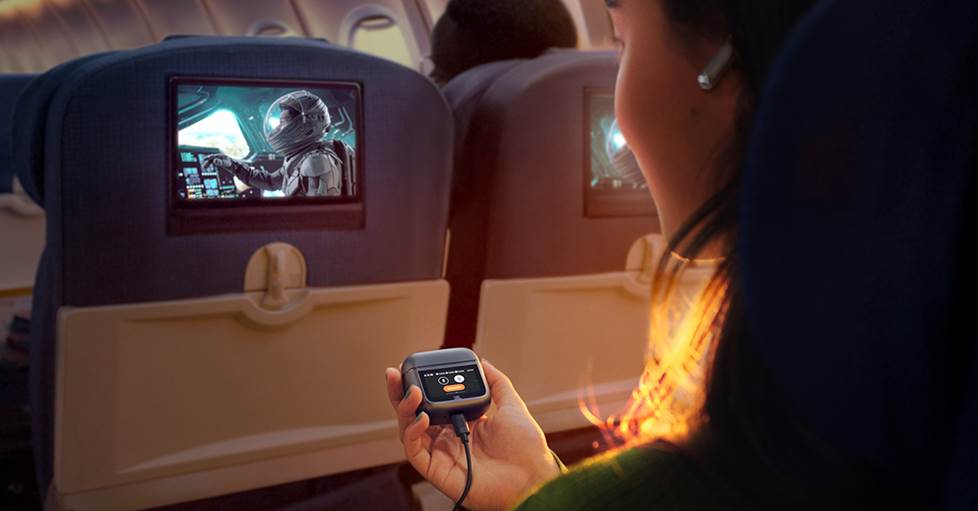
The case connects to an in-flight entertainment system and sends audio wirelessly to the earbuds.
It even includes a brand new feature called Auracast, that will let you broadcast the audio to other compatible headphones or devices.
Sound quality — “the best incarnation of the Harman Target that I’ve heard in earbuds”
JBL uses a hybrid, two-driver system in each earbud. There’s a dynamic driver dedicated to the lower-end and mids, along with a balanced armature driver dedicated to the upper region. And to my ears, these earbuds were tuned precisely the way they should be. They deliver a clear, engaging sound that's linear and accurate.
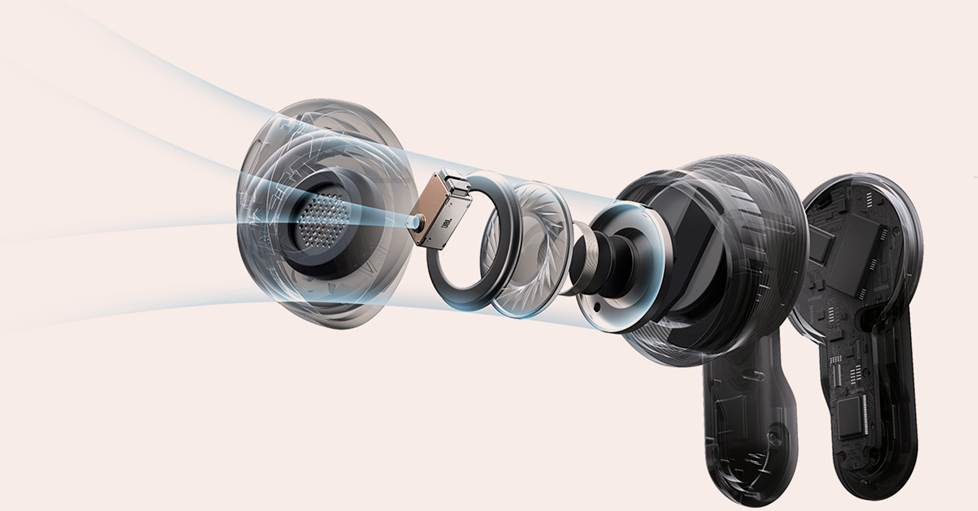
An exploded view of the earbud to show the dual-driver system.
These earbuds were tuned using research from the sound engineers at Harman, JBL’s parent company. Last year, I visited Harman’s research and development labs and spoke to Dr. Sean Olive, their head of acoustic research. While it seems like companies from all sectors are cutting back on R&D, Harman is doubling down on it.
In these hallowed halls, Dr. Olive and his team led a monumental study into headphone listening preferences. They developed the Harman Target listening curve — a distinct set of frequencies that is pleasing to a wide variety of listeners. It’s become the starting point for tuning headphones — not only at Harman and JBL, but practically industry-wide.
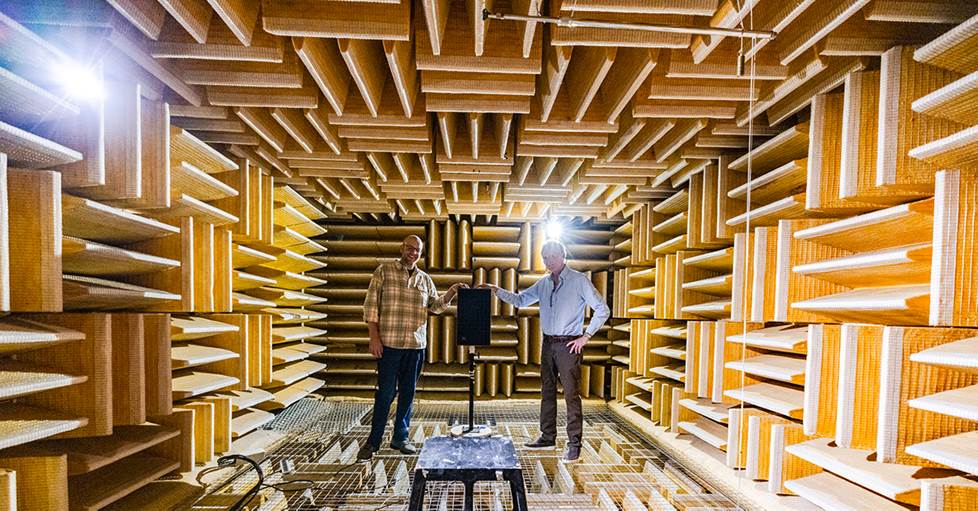
Inside one of several anechoic chamber at Harman's R&D labs with Dr. Sean Olive, head of their acoustic research.
And the JBL Tour Pro 3s deliver the best incarnation of the Harman Target that I've heard in earbuds yet. You don't often feel bass in headphones the way you do with a subwoofer in a room. But that's what happened from the opening thump of the bassline on “Black Code Suite” off LL Cool J’s new album.
This Q-Tip production hits hard without any embellishment or bloat in the bass, while LL’s vocals, the instruments, and back-up vocals are all well-separated. Higher frequency strings and guitar chords come in near the end of the track, presenting plenty of detail in a smooth, pleasant way.
Spatial audio goes up (and around) a notch
These earbuds also take a major leap from the Tour Pro 2s when it comes to spatial audio. This is something that Harman is betting big on.
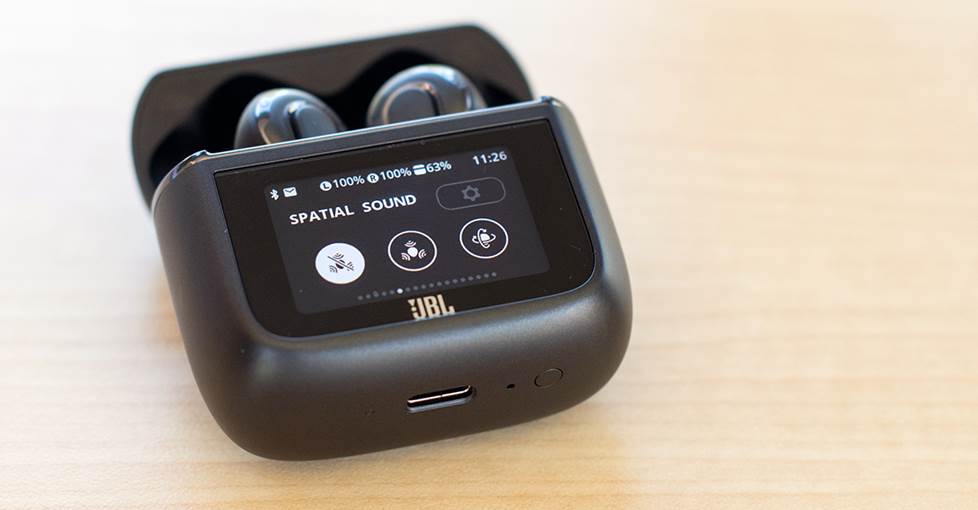
The Tour Pro 3 earbuds have spatial sound settings that you can access on the case's touchscreen.
In fact, the centerpiece of their latest research is an ominous, imposing steel structure called the Hyperion sphere. This mammoth, moveable sphere measures how our brains perceive directionality in sound.
When test subjects sit inside, they wear special earplugs with built-in microphones. Sound is played from the speakers that are positioned all around and even suspended above. The resulting data provides a pattern of how the ear responds to music from all different directions.
It may seem like overkill to use this huge sphere to improve something as small as the Tour Pro 3 earbuds. But when I listen to certain Apple Music tracks mixed for spatial audio through them, it all makes sense.
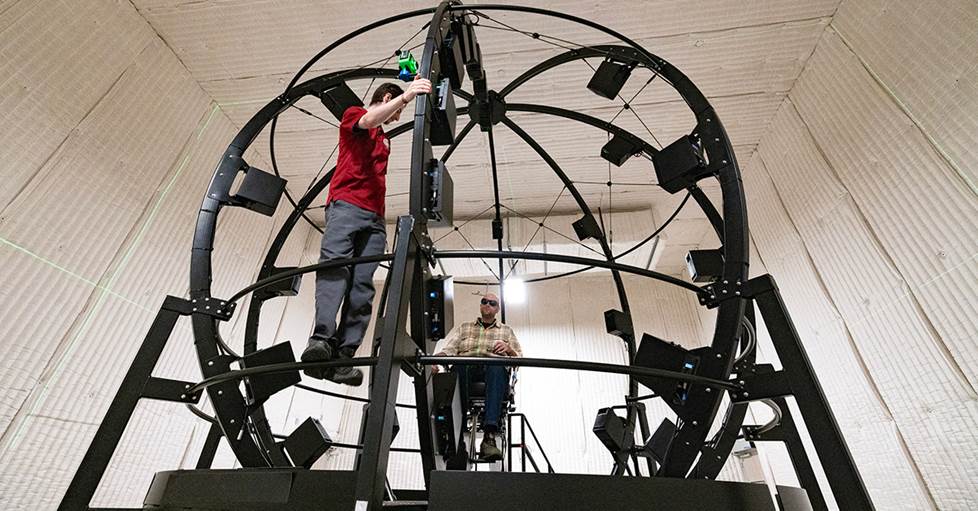
26 professional JBL loudspeakers (including four subs) that surround the massive Hyperion Sphere, all to help improve spatial audio.
I listened to the Atmos mix of Henry Brandt’s 26-minute orchestral piece Ice Field, and the sonic scope was uncanny. Directionality was a level beyond the previous-gen Tour Pro 2s — already better than most earbuds for spatial audio.
A little background on this recording: it was from a performance in San Francisco at the Davies Symphony Hall where orchestra members were strategically placed around the building. The strings were on stage as usual, while the horn and percussion sections played from the surrounding lofts and balconies. Through these low-profile earbuds, I was able to grasp the full magnitude of this sprawling symphony hall.
New to the Tour Pro 3s — you can also use the built-in head-tracking. This keeps the soundfield centered, even as you move your head around. Again, a major trip when listening to the recording of Ice Field — it was like instruments were playing from everywhere.
Head-to-head comparisons with other top-selling noise-canceling earbuds
Here are some quick notes on how the JBL Tour Pro 3s compare to other wireless noise-canceling earbuds.
JBL Tour Pro 3 vs. Sony WF-1000XM5
For a while now, I’ve called the Sony 'XM5s the “best all around” wireless earbuds. But man, is JBL making the conversation interesting.
As noted, Sony’s active noise cancellation is right up there near the top, probably second or maybe “1B” to Bose. But I prefer the out-of-the-box sound tuning of the Tour Pro 3s over the the Sony 'XM5s.
Still, with the Sonys you can adjust settings, dial back the bass a bit, and get a relatively linear sound. Of course, sound is subjective — so my preference won’t translate to everybody. But again, JBL starts their research from a place of “what satisfies the most people” and tunes their headphones accordingly. From there, the other features are pretty neck and neck with each other.
So, a lot comes down to the case — do you prefer the screen and features that JBL includes, or the smaller, more travel-friendly design of the Sony case?
JBL Tour Pro 3 vs. Bose QC Ultra
Bose can provide the most overall quiet you’ll get from a pair of earbuds. Period. It’s actually kind of unreal. There are also some people who prefer the Bose fit — it kind of rests on the ear vs. going deeper down the canal like most earbuds.
Those are two valid reasons to choose the Bose, but for pretty much any other head-to-head attribute, I’m leaning toward the JBL Tour Pro 3. For one, I haven’t yet pointed out how clear phone calls are through these JBL earbuds. The strong built-in mics work alongside AI to filter out background noises. In fact, during a Zoom meeting, I apologized to someone about all the noise my kids were making in the room over — they told me they couldn’t hear anything but my voice.
JBL Tour Pro 3 vs. Apple AirPods Pro 2
Since their release a few years ago, the AirPods Pro 2 have been my automatic recommendation for iPhone users. They just sync up so easily and work so well with Apple gear — and of all the Apple headphones, the AirPods Pro 2 are tuned closest to the Harman Curve.
But when it comes to pairing, phone calls, and snappy controls, the Tour Pro 3s seriously close the gap. And obviously with the case, they do some things that the AirPods can’t.
So, it really comes down to what features you need most. For example, the new update that essentially turns AirPods into a set of hearing aids is kind of mind-blowing. But using the JBL case to watch in-flight movies might be more important to you if you travel a lot. And since I value sound quality most, I would lean towards the Tour Pro 3s — I even think they do spatial audio better than Apple themselves.
JBL Tour Pro 3 vs. JBL Live Beam 3
Perhaps the most interesting comparison to the Tour Pro 3 comes from JBL themselves. The Live Beam 3s have a smaller screen, only one driver per earbud, and a somewhat streamlined feature set. But for a lower price, it offers a high percentage of what I love about the Tour Pro 3s.
The Live Beam 3s also a little lighter, so I could see some preferring their fit. Noise cancellation is not as effective as the Tour Pro 3s, but they do a good job with day-to-day noises. And they handle the low-end rumble of my lawn mower well — usually a good barometer for how well it would handle plane engine noise.
Speaking of planes, you lose the ability to use the case as a Bluetooth transmitter. And that’s probably the most striking difference between the two.
Sound-wise, you’re still getting that JBL/Harman curve tuning, with real presence and bite. It’s just that extra percentage, extra nuance — in some ways intangible — that you get with the JBL Tour Pro 3s. Like anything, it’s do you want the crème de la crème or do you want to get “oh so close” and save a little bit with super-solid earbuds?
If your answer is, "I want it all" — that’s why the JBL Tour Pro 3 earbuds were created. I always shy away from the term “future-proof,” but these are some of the most advanced, top-performing wireless earbuds you can get today. And I think a lot of these features will still be impressive and a joy to use for years to come.
Need help? Contact us!
Have questions about these or any other headphones? Contact us today.
Our expert Advisors know our gear inside and out. Your Advisor can send specific Crutchfield pages to your screen, saving you a lot of browsing time. You'll get a shopping cart loaded up with everything you need.
Free lifetime tech support is included with your Crutchfield purchase.






Comments (0)