Intro to high-resolution audio
Digital music that gets back to great sound

In this article: We’ll answer your questions about high-res audio and cover everything you need to know, including…
- High-res audio specs
- High-res file types
- Where to find high-res music
- Media players for high-res audio
...and we’ll also talk about high-res audio gear for listening at home and on the go.
It's the small details that make your music come alive — the sizzle of brushes on a cymbal; the sound of fingers gently gliding along guitar strings; a quick intake of breath before the singer starts. Want to hear all those hair-raising details? Give hi-res audio a try.
Hi-res audio files sound better than CDs. And they sound way better than the compressed digital audio files we get from Spotify, Deezer, Amazon, and most music streaming services. They come much closer to capturing all the nuances of the original performance.
What is high-res audio?
High-res audio formats give you excellent sound quality and the convenience of digital audio files. High-res music files are larger than low-res music files. That’s because they retain almost all the audio information from the original recording. As a result, they take up more space on your hard drive and require more bandwidth for streaming.
Does high-res music sound better?
It depends. Digital audio, like digital images, consists of files of encoded bits of data. And for both, the more data the files contain, the more details of the original are retained. Low-resolution photos can appear murky, especially when they’re blown up. High-resolution photos generally reveal more details when you zoom in. And they usually look clear and in focus in a variety of sizes.
The same is true of digital audio. Low-res audio files tend to sound fine played through inexpensive headphones, smartphone speakers, or small Bluetooth speakers. In these systems, high-res audio can sound a little better, but not dramatically so.
Playing digital audio through high-performance gear is equivalent to blowing up digital images. The more detail your equipment is capable of delivering, the more its absence is noticeable with low-res files. And the more details you can hear with high-res audio.
So, is high-res audio worth it?
If you’ve already invested in high-performance audio gear, then you’ve already answered that question. If you haven’t — and you’re happy with the sound of your system — then the answer’s no.
High-resolution audio tracks offered by streaming services usually require a higher subscription tier. And for downloading, these tracks can cost a little more, too. But if music is your passion, it's a small investment towards increased listening pleasure.
High-res audio specs
Recordings are converted to digital audio through a series of waveform samples. This process is called linear pulse-code modulation. It’s usually shortened to just "pulse-code modulation", or PCM. The resolution of a PCM digital file is described in terms of bit depth and sampling frequency.
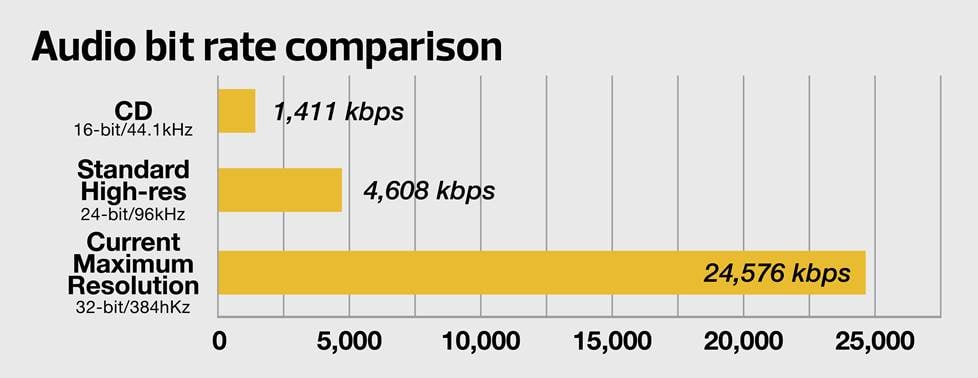
High-resolution audio can provide much more musical detail than CD.
The bit depth tells you how detailed each sample is. High-res files usually have a depth of at least 24 bits.
The sampling frequency tells you how many samples were taken per second during the digitization process. More frequent sampling leads to smoother, more natural sound. High-res files have sampling rates up to 192kHz, and sometimes higher.
Of course, all that extra information increases file size. A 24-bit/96kHz high-res music file, for example, is about three times bigger than a CD-quality file of the same music track.
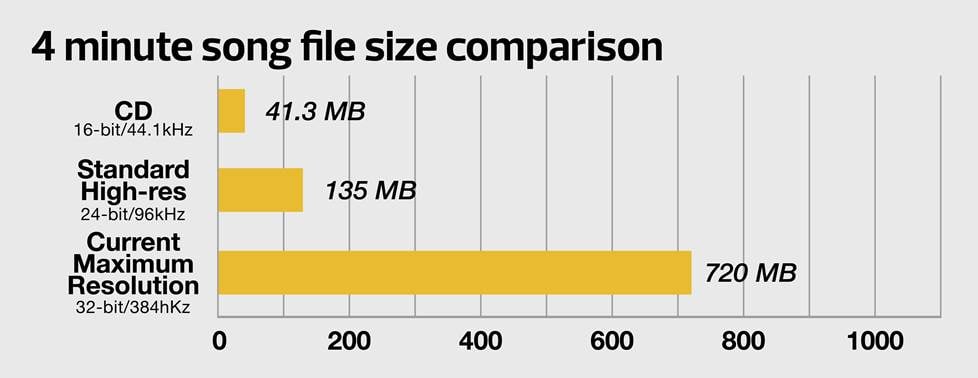
32-bit/384kHz files are dramatically larger than CD-sized files. Some wireless systems don't have the bandwidth to stream such large files and may down-convert them to a lower resolution for streaming.
High-resolution audio file types — bigger and better
It's important to know which high-resolution file types are compatible with your system. The formats below are encoded using linear pulse-code modulation (PCM). This is the process used to digitally sample and encode an analog signal.
Compressed vs. uncompressed audio files
There are two basic types of PCM files: compressed, and uncompressed. In the early days of digital music, transmission bandwidth and memory storage were at a premium. So compressed files were ideal — they could be transmitted and downloaded quickly and didn’t take up a lot of memory.
But there is a tradeoff. The compression eliminated the extreme highs and lows of the music and some of the finer detail. These are known as “lossy” files, as some of the original data isn’t transferred, and therefore lost.
Over time internet connections became stronger, and bandwidth for both wired and wireless connections increased. File storage also dropped in price, and memory space became available for uncompressed audio.
An uncompressed file contains all the digital information of the original. For that reason, they’re also known as “lossless” files. Uncompressed files tend to sound more detailed. And since they have the extreme highs and lows of the original, they also tend to have more presence and detail.
Not all uncompressed files are the same, though. A 24-bit/96kHz file can be uncompressed, as can a 32-bit/384kHz file. But there will be a difference in sound. It’s similar to viewing an image on, say, a 4K LED TV vs. an 8K OLED TV.
Here’s a rundown of the most common high-resolution formats. Apple formats generally can only be played on iOS devices or software. Some of the highest-resolution formats can’t be played on Apple Music® or Windows Media Player. Generally, specialized high-res media players can handle all the formats listed below.
Uncompressed audio formats
WAV (Waveform Audio File) is the standard digital format found on commercial CDs. These are uncompressed files. WAV files can be played on both Windows® and Apple® devices.
AIFF (Audio Interchange File Format) is an uncompressed file format designed for Mac® and iOS devices. Some streamers can handle AIFF files, but they’re usually unreadable on Windows-based computers (unless they’re running Apple Music).
Lossless audio formats
FLAC (Free Lossless Audio Codec) was developed as a free software project. FLAC is known as a lossless format. That’s because it compresses – but retains – all the data from the original file. When played back, FLAC restores the compressed information, restoring all the detail of the music. So while FLAC files are smaller than other uncompressed formats, there’s no loss of data. FLAC files are currently incompatible with Apple Music.
ALAC (Apple Lossless Audio Codec) can be considered the Apple version of FLAC. It also retains all the digital information of the original, but compresses it for storage. Like FLAC, the file sizes are relatively small. And during playback, all the compressed data is restored. ALAC isn’t supported by all non-Apple devices. But it can be played on systems running Windows 10 or higher.
Other audio formats
DSD (Direct Stream Digital) uses a very different process for encoding analog audio. It samples the sound as a stream of single bits (vs. PCM’s multi-bit chunks). DSD also uses a much higher sampling rate, and actually over-samples the sound 64 times for greater accuracy.
DSD is the format used for SACDs, which is why they can’t be played on a standard CD player (although many SACD releases also include a PCM version).
Most high-res digital players convert DSD files to PCM for playback. Some players support native DSD playback.
MQA (Master Quality Authenticated) is an additional encoding process that makes PCM and DSD files small enough for wireless streaming. The process preserves all file information for playback through audio components with an MQA decoder.
MQA is backward compatible. MQA-encoded files can be played through any audio equipment. It’s only when you use an MQA decoder that you’ll hear the full detail of the music.
Learn more about how MQA makes high-res audio files small enough to stream.
Where to find high-res music online
Here's a short list of some of the major sites offering high-resolution downloads and streaming. One thing to be aware of is that not all high-res files are created equal. Most sites list the resolution of the files in the description. Many of these sites offer two-tier plans, with the high-res option being the more expensive.
Amazon Music Unlimited offers two tiers of subscription plans for their service. Both include tracks encoded with FLAC up to 24-bit/192kHz, Dolby Atmos®, and 360 Reality Audio files.
Apple Music offers AIFF and spatial audio with Dolby Atmos files. It also has a sister app, Apple Music Classical, designed for classical music lovers.
Deezer HiFi has a wide selection of audiophile recordings available. Deezer HiFi uses FLAC, and requires a subscription.
HDtracks offers the world's largest selection of high-res audio downloads. You can find titles in WAV, AIFF, ALAC, and FLAC formats, though not every song is available in every format.
HighResAudio has an extensive selection of music in all genres for downloading and streaming. Files are available FLAC, DSD, and MQA encoding, though not every song is available in every format.
iTrax sells high-fidelity downloads in stereo or surround sound. Selections are available in WAV or FLAC formats.
Qobuz uses FLAC for its downloadable titles. One nice feature is that many of the albums also include digital booklets with downloads. A subscription is required.
TIDAL was originally conceived as a high-res streaming service. All subscription plans offer FLAC and Dolby Atmos files.
Media players for high-res audio
There are many ways to play high-res audio files. If you subscribe to any of the streaming services above, their apps are compatible with the formats they offer.
Apple Music can play AIFF and WAV files, but it's probably not the best choice if you're building a high-res music library. The app doesn't provide the best sound quality, and it doesn't support common high-res formats like FLAC.
If you're looking for a high-res media player that works with your Apple Music library, check out Amarra, Audirvana, or Pure Music.
The latest version of JRiver Media Center is compatible with MacOS®, and also runs on Windows® and Linux systems.
Roon is a subscription-based music management system that provides extensive info about your music, including artist bios, photos, reviews, lyrics, and show dates. Its "Discover" feature lets you find new music based on your preferences. Roon offers optional integration with TIDAL. Learn more about how Roon makes high-res listening easy and fun.
Gear for listening to high-res music
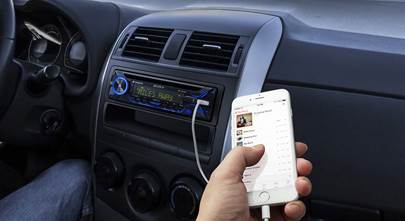
High-res audio support has made its way into all sorts of audio gear, from stereo components to home theater receivers and even sound bars and car stereos.

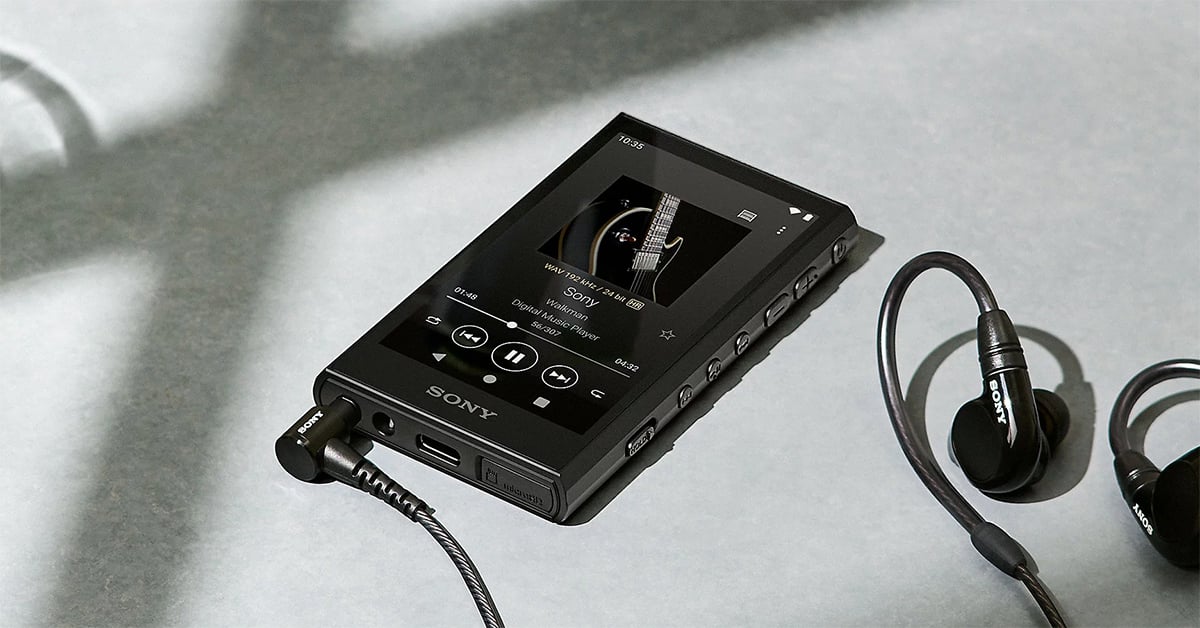
A portable high-res music player lets you enjoy high-quality sound anywhere.
On-the-go listening
Portable high-res music players let you take your music collection with you. They come with ample memory for file storage. Some also have SD card slots so you can take even more tunes along.
Several players also have built-in headphone amps. This powers your high-performance headphones, giving you the best listening experience.
Listening at home
You can make high-res audio streaming a part of your current audio/video system, or build a new one from scratch. Most network music players let you add high-res streaming to an existing stereo system. And many stereo receivers and integrated amplifiers offer high-res streaming capability. Plus, they usually have the capacity to power high-performance speakers and headphones to deliver optimal sound.
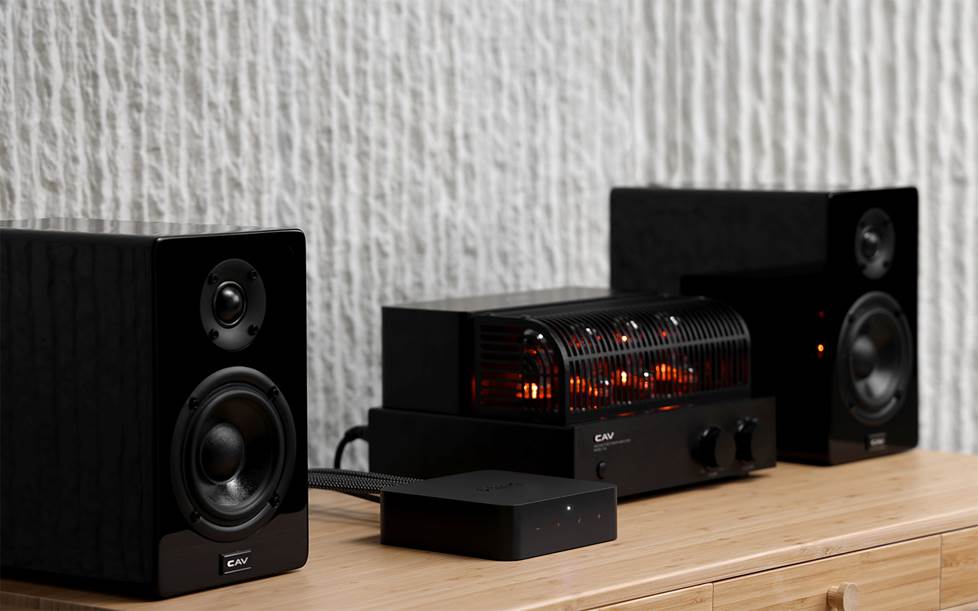
Adding a high-res capable music streamer to your existing stereo system is an easy way to level up your listening at home.
Some home theater receivers also offer high-res streaming, so you can consolidate all your entertainment options into one system. Many of these systems also have multi-room audio capabilities. This allows you to enjoy your high-res music not just from the source, but in any room where you’ve set up compatible gear.
High-res music libraries are usually stored on external hard drives that your receiver or amplifier accesses for playback. The Bluesound Vault 2i offers an all-in-one solution. It's a streaming music player with a built-in CD ripper and a 2TB hard drive. It lets you access TIDAL (including their high-res MQA service tier). It can also store downloads from high-res music sites. You can enjoy high-res music without involving a computer.
Listening at the office
High-res music in the office is simple. If you work with others, a high-res player and good headphones should do the trick. Many people who work at home (or have a separate office) play music from their computer through a set of desktop speakers.
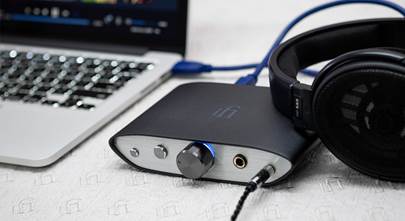
If you have good speakers, you can increase the sound quality by adding an external DAC (digital-to-analog converter). This plugs into your computer’s USB port. It bypasses the computer’s DAC and processes the digital information from your files directly.
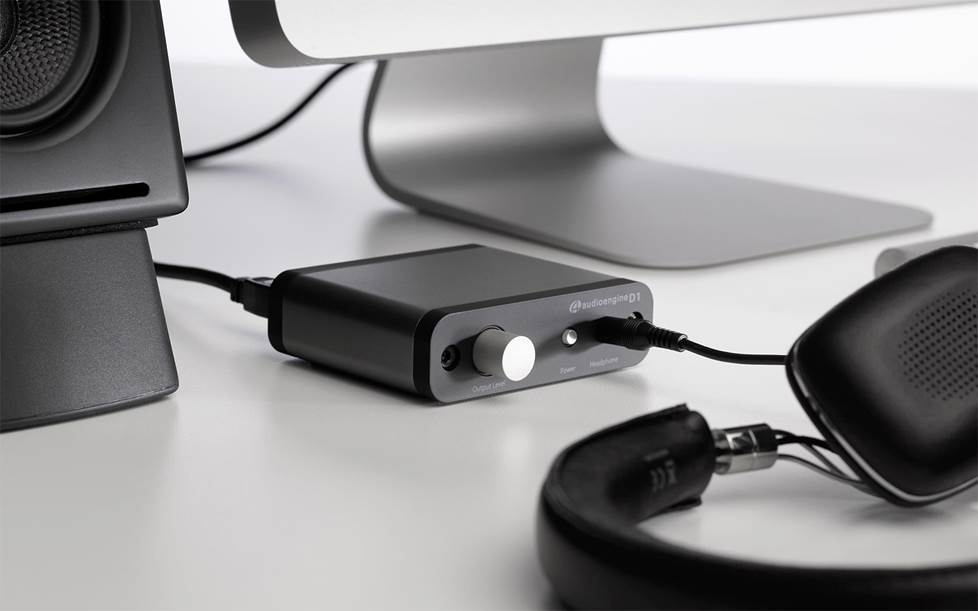
Add an external DAC to your desktop audio system for more detailed sound.
High-performance external DACS can handle files up to 32-bit/123kHz and DSD files up to 22.58 MHZ without down-converting. Even the small portable DACS can process files up to 24-bit/96kHZ. And many are MQA-compatible.
Personalized advice from our team of experts
Have questions about which high-res formats and equipment will best suit your needs? Our expert Advisors know the gear inside and out. Contact us today.
Free lifetime tech support is included with every Crutchfield purchase.


mobilee.jpg)



Del from Redding
Posted on 12/8/2025
I've loved this company since late 80's I'm impressed with the fact their still here and thriving
Uwe Zimmermann from Naples, FL
Posted on 8/18/2025
There is a typo in one of your paragraph headers, which currently reads "Compressed audio formats", but it should read "Uncompressed audio formats" instead (for WAV and AIFF file formats). Great article, though!!!
Deia Z. from Crutchfield
on 10/6/2025
LaToya Jaxon from Alberta, ca
Posted on 5/13/2018
I used to download youtube videos then convert into mp3 so my questions is do i have a good quality sound from there? For me stills sound clear and nice treble and bass
C S
Posted on 5/6/2018
I believe two things needed to be mentioned in this article - Hi-Res Music Source - 7Digital should have been mentioned. They have better GUI which clearly identifies 16 and 24 bit FLAC and their search function is better than HDTracks. I also found out that certain albums are available in Hi-Res format only on 7Digital. One big example is Pink Floyd. Many Pink Floyd albums are not available on HDTracks. - Hi-Res Media Player - Foobar 2000 should have been mentioned. It is the most widely used player and most configurable player available out there, but it is something that Apple devotee might have not heard of.
JOhn from Chicago
Posted on 4/24/2018
How to convert old band tapes to High Res into my laptop. What hardware and software is needed. I had them converted by a studio but they just used a regular PC.
Steven Downes from Corvallis
Posted on 6/25/2017
So, I would love to buy Hi-Tech audio, but do you know what is preventing me from taking the step? The mastering process. When an album gets "re-mastered", typically it is compressed and louder and gas terrible Sonic's that makes a very tiring listening experience. So, how do I know which version I am buying. I want the original artist recording and not the inferior remastered versions. How can I be sure which I am buying? From what I see, the vendors don't indicate this.
Happy_Fillmore from SW Wisconsin
Posted on 3/30/2017
Nice to see JRiver Media Center recommended. I'd like to point out it is available for Linux as well as PC and Mac. It's server feature is great too. It allows me to stream my hi-res flac files to my mobile devices (among other playback options) without conversion as long as whatever network I'm on can keep up. 4G LTE does pretty good with 24/96 files in my area. Bottom line? Good choice for Crutchfield to list for this article.
Ben oukadon from Austin tx
Posted on 1/14/2017
We can tell this writer is anti-Sony and Apple's pay stub. If you're going to write about HiRes AUDIO you have to mention Sony.
Ahwar
Posted on 9/14/2016
You're on the money...
JohnInHvl
Posted on 4/25/2016
Steve from Philadelphia, you may want to have another cup of coffee. But didn't you mean to say that 1000 MB is 1 GIgabyte, and 1000 Gigabytes is 1 Terabyte. Which is also 1,000,000 MB . Unless you are looking at processors which look at them as 1024 MB, 1024 GB ... The binary equivalents.